file
file /path/to/it reports the type from the file’s own header: ELF executable, shell script, PHP, archive, or data. An ELF binary in a hosting account’s dot-directory is a finding by itself.
Guide · Malware outside public_html
The site has been cleaned, the scanners report clean, and something keeps rewriting files anyway — or a host or a neighbouring account has been flagged, and you need to know what sits in the hosting account outside the web root. This guide covers where a backdoor hides in a Linux or cPanel home directory, the read-only commands that surface it, which dot-directories are normal, how to review SSH keys for every user, how to confirm a file without running it, and the order to remove it in.
Published Last reviewed
Why it is there
On a Linux web server every hosting account is a user with a home directory. The website lives in one folder of it — public_html on cPanel — but the account user can write to all of it, and so can anyone who gets code execution through the site or steals the account’s SFTP or panel password. The home directory is the most useful place to put something that should last.
It lasts because nothing that looks after the website looks there. A WordPress security plugin scans the WordPress installation; a reinstall replaces files inside public_html; a site restore often restores only the site. None of them touches ~/.config, ~/.ssh, or a crontab. A file above the web root is not reachable over HTTP, so nothing that crawls URLs will request it, and a leading dot keeps a directory out of FTP and File Manager listings unless hidden files are shown.
No root access is needed. A binary owned by the account user can be placed and run with exactly the rights the compromised site already had — including the right to keep rewriting the site’s files after every cleanup.
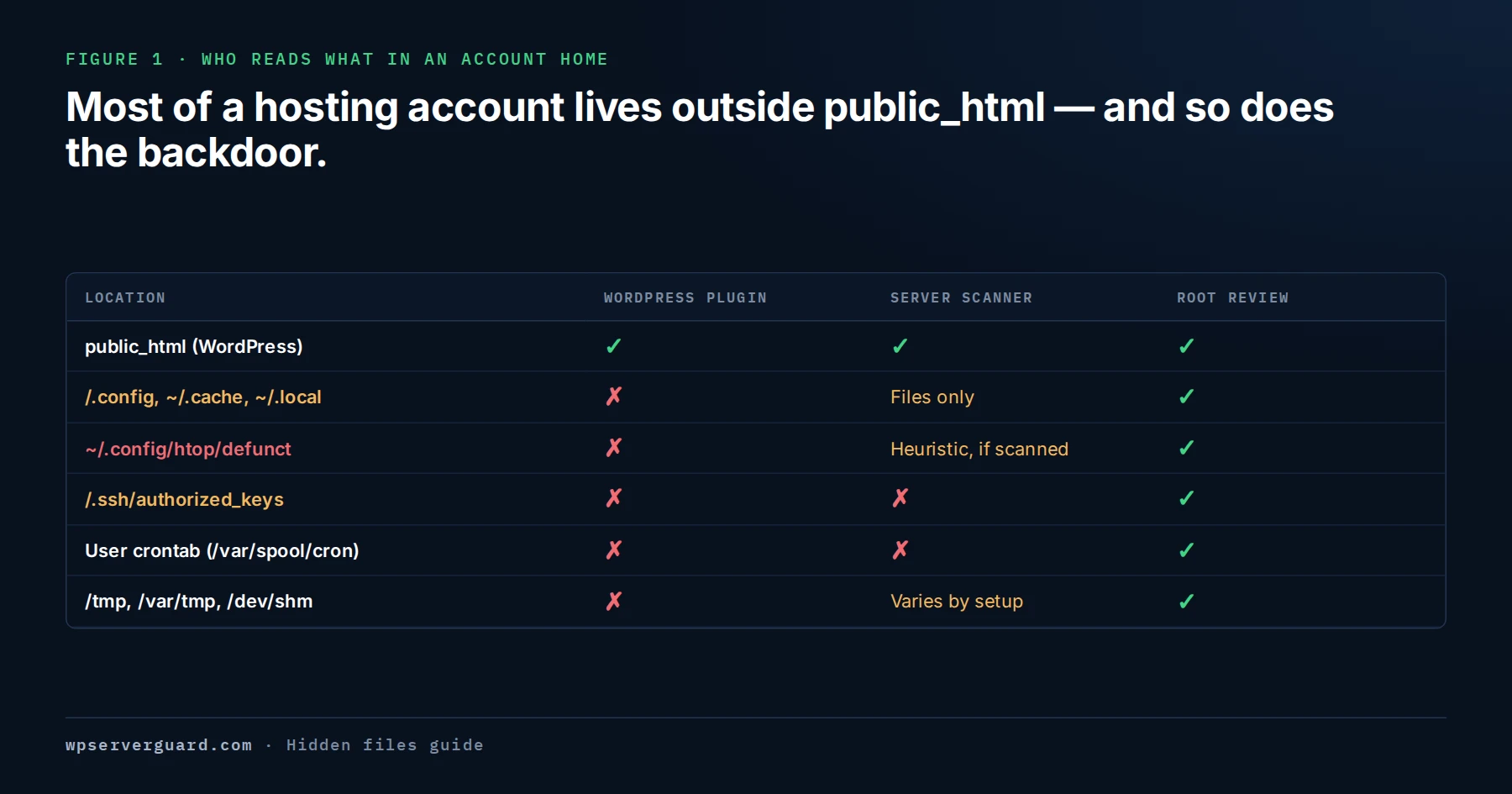
In the 261-account case the backdoor sat in ~/.config/htop/defunct: 1,388,544 bytes, mode 0700, owned by the cPanel user — outside everything a WordPress plugin reads.
Time windows
Start from time, not filenames. Attackers rename and relocate; they rarely control every timestamp. A window taken from files you know were changed turns a whole-server search into a short list.
Run stat -c '%y %n' on a handful of the files a scanner already reported and widen by a few days either side. In the 261-account case, the rewrite times of the 283 infected plugin and theme files defined the window.
find /home -type f -newermt '2026-08-20' ! -newermt '2026-08-27' -not -path '*/public_html/*' -ls 2>/dev/null. -newermt compares modification time with a date or 'YYYY-MM-DD HH:MM'; the ! means “not newer than”. Use your own dates.
find /home -type f -newerct '2026-08-20' ! -newerct '2026-08-27' -not -path '*/public_html/*' -ls 2>/dev/null. touch can set modification time to any date; change time (ctime) is set by the kernel on every content or metadata change, and ordinary users cannot set it. An old mtime with a recent ctime deserves a closer look.
find /home -type f -mtime -7 -not -path '*/public_html/*' -ls lists files modified in the last seven days; -mmin -120 narrows to the last two hours. Useful when you only know roughly when it started.
Executables and ELF binaries
A hosting account that serves web pages, mail, and configuration has very few reasons to hold a compiled program, which makes this one of the highest-yield checks there is.
find /home -type f -perm -u+x -size +100k -not -path '*/public_html/*' -not -path '*/node_modules/*' -ls 2>/dev/null. Small scripts fall under the size limit on purpose; run it again without -size once the large results are explained.
find /home -type f -size +10k -not -path '*/public_html/*' -not -path '*/node_modules/*' -exec file {} + 2>/dev/null | grep ELF. file reads each file’s header and runs nothing. It catches a binary stored without its execute bit or renamed to .jpg. Run it off-peak.
Expect some legitimate hits: wp-cli.phar and composer.phar (PHP archives, which file does not report as ELF), user tooling in ~/.local/bin or ~/bin, and on CloudLinux the Node.js and Python selector environments under ~/nodevenv and ~/virtualenv. Each result needs an owner you can name.
Dot-directories
A healthy cPanel account has a dozen or more hidden directories. The table lists what the common ones normally are. Names and contents vary with cPanel version, CloudLinux, and installed software — verify against your panel and a known-good account on the same server.
The quickest way to find the outlier is to count names across accounts rather than read each one. find /home -mindepth 2 -maxdepth 2 -name '.*' -type d -printf '%f\n' | sort | uniq -c | sort -n lists every top-level dot-directory name with the number of accounts that have it. Names that appear in nearly every account are usually the panel; names that appear in one or two are where to start.
Watch for names built to be skimmed past: a real tool’s name in the wrong place, a name one character off a normal one, a directory called “.. ” with a trailing space, and a .bash_history linked to /dev/null so no shell history is kept.
| Directory | What it normally is | What deserves a second look |
|---|---|---|
| .cpanel | cPanel’s per-account data: caches, settings, and datastore files. | Executables. The panel writes data here, not programs. |
| .cphorde | Horde webmail data. May remain on older accounts after Horde was removed from cPanel. | Recent changes where nobody uses Horde. |
| .softaculous | Records of apps installed through Softaculous. Some data files carry a .php extension. | Differences from a clean account; anything executable. |
| .wp-cli | WP-CLI’s per-user cache, configuration, and installed packages. | Present where nobody uses WP-CLI; binaries. |
| .cache | Per-user cache for tools such as Composer or pip. | Executables; folders for tools the account does not use. |
| .local | Per-user data, and in ~/.local/bin, scripts installed with pip --user or similar. | ELF binaries with no matching installed tool. |
| .config | Per-user configuration for command-line tools, such as ~/.config/htop. | Anything but small text config files. ~/.config/htop/defunct is the documented gsocket path. |
| .ssh | authorized_keys, known_hosts, and any key pairs imported through cPanel’s SSH Access. | A key nobody added, a second authorized_keys2 file, or any executable at all. |
| .trash | Files deleted through cPanel File Manager, kept until the trash is emptied. | Check it: malware deleted through File Manager is often still here. |
| .htpasswds | Password files for cPanel Directory Privacy (password-protected folders). | Password files for folders nobody protected. |
| .spamassassin | SpamAssassin per-user preferences (user_prefs) and Bayes data. | Executables; changes unrelated to spam settings. |
| .cagefs | On CloudLinux with CageFS, per-user runtime data, including the user’s private /tmp. | Executables in its tmp folder. |
SSH keys
An SSH key is a backdoor with no file for a scanner to find. It survives every password change, reinstall, and malware cleanup until somebody removes it. Review it for every account, not only the flagged one.
find /home /root -maxdepth 3 -path '*/.ssh/*' -name 'authorized_keys*' -ls 2>/dev/null. The glob also catches authorized_keys2, which OpenSSH’s built-in default still reads unless AuthorizedKeysFile is set. A recent modification time on an account nobody administers is a finding by itself.
sshd -T | grep -i authorizedkeys prints the effective AuthorizedKeysFile and any AuthorizedKeysCommand. If either is set, keys may be read from somewhere else.
ssh-keygen -lf /home/USER/.ssh/authorized_keys prints the type, fingerprint, and comment of every key in the file. The comment is free text an attacker can set to your own name — match fingerprints, not labels.
Look for command=, from=, or environment= before a key. A forced command can be a legitimate backup key — or a way to run something every time the key is used.
grep 'Accepted publickey' /var/log/secure* on AlmaLinux, Rocky, or CloudLinux (/var/log/auth.log* on Debian and Ubuntu). Modern OpenSSH logs the user, source address, and fingerprint of the key that authenticated — enough to tell a staged key from one that has been used.
Temp and mail paths
World-writable paths are where payloads are staged and run from; mail directories are where nobody looks.
find /tmp /var/tmp /dev/shm -xdev \( -type f -perm /111 -o -name '.*' \) -ls 2>/dev/null lists files with any execute bit and anything hidden. On CloudLinux with CageFS, each user’s /tmp is under ~/.cagefs/tmp, and cPanel accounts also have their own ~/tmp — include both.
findmnt -no OPTIONS -T /tmp. noexec (on cPanel servers often set by cPanel’s securetmp script) blocks direct execution of a binary from /tmp, but not a script passed to an interpreter, and not a payload copied into a home directory first.
/dev/shm is held in memory. A reboot erases whatever was staged there, so copy anything suspicious out first.
cPanel keeps mail in ~/mail/<domain>/<mailbox>/ in Maildir format: cur, new, and tmp folders of message files. An executable or an ELF binary anywhere under ~/mail does not belong. Mailboxes you did not create show up in ~/etc/<domain>/passwd.
Confirm it
Establish what the file is from its properties. Do not run it, chmod it, or open it in anything that might execute it.
file /path/to/it reports the type from the file’s own header: ELF executable, shell script, PHP, archive, or data. An ELF binary in a hosting account’s dot-directory is a finding by itself.
stat /path/to/it gives owner, mode, size, and timestamps. Mode 0700, owned by the hosting user, created inside your window, is the profile from the documented case.
sha256sum /path/to/it produces the hash to record and compare. The gsocket sample from the 261-account server was 745fc2346e9ad0fdd00104c6d8732ecf7759cb053bd61c296c7b26e9ddb98d50. A match confirms that build; a non-match proves nothing, because binaries are trivially repacked.
strings -n 8 /path/to/it | less shows readable text inside the binary, such as hostnames and paths. Do not run ldd on an untrusted binary: it can execute the program to resolve its libraries.
Look the SHA-256 up on a multi-engine scanner before uploading the file. Uploads are shared with the service’s subscribers, and a key file may contain your secrets.
ls -l /proc/[0-9]*/exe 2>/dev/null | grep deleted finds processes whose executable has been removed from disk. cp /proc/PID/exe /root/evidence/PID.exe recovers a copy of it without running anything.
Remove it
Deleting first feels like progress. It destroys the evidence that answers whether the file ran, what it reached, and whether a copy exists elsewhere — and it does nothing about the access that placed it.
mkdir -p /root/evidence, then cp -p --parents /home/USER/.config/htop/defunct /root/evidence/ keeps the file with its mode and timestamps. Save its stat and sha256sum output, export the account’s crontab, and copy the SSH, web, mail, and panel logs while they exist.
Suspend or restrict the account, block its outbound connections at the firewall, disable its cron, and record then stop its processes.
From a device that is not part of the incident: panel and SFTP passwords, SSH keys and authorized_keys entries, database users, WordPress administrators and application passwords, panel API tokens, and every secret in the account’s wp-config.php and .env files.
Only now remove the binary, any key file beside it, and every cron entry, shell-profile line, or service unit that referenced it.
Replace the application from verified sources, then repeat the sweep days later, once cron and real traffic have run again.
Every account
One finding in one account on a shared server is a server-level question until the same method has been applied to every account. Run the sweep as root, write one output file per account, and compare them — the account that differs from its neighbours is the one to open first.
getent passwd | awk -F: '$6 ~ "^/home" {print $1, $6}' lists users with a home under /home; on cPanel, /var/cpanel/users/ holds one file per account, and some servers also use /home2 or later — adjust the paths to your layout. For each account, run the time-window, executable, ELF, and authorized_keys checks above, list its crontab with crontab -l -u USER, and check ls -la /var/spool/cron for crontab files belonging to users you did not expect.
Accounts that share an owner, a deployment routine, or a backup source with the flagged one first; then the rest.
The same timestamp cluster in several accounts is a stronger signal than the same filename.
The same artifact, path, or time cluster in more than one account turns an account incident into a server incident — and possibly a rebuild onto a fresh host.
No cron entry does not prove a binary never ran, and short log retention rarely proves an entry path. Record those as undetermined.
Common questions
ls -la ~ shows hidden entries in one directory. To search a whole home, run find /home/USER -name '.*' -ls, and to see hidden directories across every account, find /home -mindepth 2 -maxdepth 2 -name '.*' -type d. In cPanel File Manager, open Settings and enable “Show Hidden Files (dotfiles)”.
Search the account home with public_html excluded: files changed in your incident window (find -newermt), user-owned executables (-perm -u+x), and ELF binaries (file). Then review ~/.ssh/authorized_keys, the crontab, /tmp, /dev/shm, and the mail directories.
Usually not. A normal cPanel account has many — .cpanel, .softaculous, .spamassassin, .trash, and others. Compare the names against a clean account on the same server and look inside for executables or recent changes.
Use find with a date window: find /home -type f -newermt 'START' ! -newermt 'END' -ls. Repeat with -newerct, because change time cannot be set back with touch. Take the window from files you already know were infected, then widen it by a few days.
Work from root and check what a site scanner cannot: executables and ELF binaries outside the web root, every authorized_keys file, every crontab and systemd timer, processes running from deleted files, and outbound connections (ss -tnp). Preserve before removing.
Treat it as active access. Record the key line, its fingerprint (ssh-keygen -lf), and the file’s timestamps, and search the SSH log for Accepted publickey with that fingerprint. Then remove it, rotate the account’s credentials, and find what wrote it.
Wordfence scans the WordPress installation, not the account home above it. ImunifyAV can read the home directory, but a packed binary may only raise a heuristic such as SMW-HEUR-ELF, and SSH keys and cron entries are not malware in a file.
Choose the response path
You found something
Best when a binary, an unknown SSH key, or a file that keeps coming back has turned up, and it needs preserving, containing, and removing across the server in the right order.
Nothing found yet
Best for a WHM, cPanel, or VPS server you are responsible for, where per-site scans are clean but nobody has looked above the document roots.