Is Wordfence enough? What a security plugin can and cannot see
Wordfence is a good security plugin, and for most WordPress sites it should stay installed. The real question behind “is Wordfence enough?” is narrower: what does a plugin running inside WordPress actually check, and what sits outside its reach? This guide compares Wordfence, Sucuri, MalCare, Patchstack, Solid Security and WPScan fairly, shows the layers no in-WordPress plugin can see — with evidence from a real incident where Wordfence did its job and the backdoor was somewhere else — and sets out when a manual audit or server review is worth adding.
Prepared by G. Schad, WordPress and Linux security specialist
A sound baseline for WordPress — not evidence about the server
What plugins see
The WordPress installation, as the site’s own PHP user
What they cannot see
Above the web root, processes, system cron, other accounts, keys
Recommendation
Keep the plugin; add an audit yearly, after an incident, or when asked
The short answer
Is Wordfence enough to keep a WordPress site secure?
For a small brochure site on reputable hosting, with few plugins, updates applied promptly, and two-factor authentication on every administrator, a well-configured Wordfence installation covers most of the attacks that site will actually receive: automated login attempts, known exploit patterns against WordPress routes, and commodity malware that matches known signatures. That is a genuine and useful baseline.
It stops being enough when you need Wordfence to answer a question it was never built to answer. “Is this site clean?” is a question about the WordPress installation. “Is this server clean?”, “Who still has access?”, “Can we restore from backup?” and “Does the checkout enforce its own rules?” are different questions. A plugin cannot answer them, however good it is, because of where it runs.
What it does
What Wordfence does — free vs Premium
Wordfence is a WordPress plugin that combines an endpoint firewall, a malware scanner, and login security, all running on your own server inside PHP.
Endpoint firewall (WAF)
The firewall inspects requests after they reach your server, with WordPress context — it knows about logged-in users and WordPress-specific routes. In its optimised mode it loads before WordPress through a PHP auto_prepend_file directive pointing at wordfence-waf.php in the site root, which is legitimate and expected.
Malware and integrity scanner
The scan compares WordPress core, plugin and theme files with their official versions, matches files against known malware signatures and suspicious patterns, and reports installed components with known vulnerabilities.
Login security
Two-factor authentication, CAPTCHA on login, and brute-force protection with lockouts. For many sites this is the single most valuable thing the plugin does.
Free vs Premium
Wordfence documents that the free version receives new firewall rules and malware signatures 30 days after paying customers, and that the real-time IP blocklist is a paid feature. For a business site, that delay is the main thing Premium buys. Check Wordfence’s own documentation for the current feature split.
Hands-on service tiers
Wordfence also sells paid tiers that include help from its own analysts, including site cleaning. That is a service with its own scope and terms, separate from what the plugin itself does.
Wordfence vs Sucuri vs MalCare vs Patchstack vs Solid Security vs WPScan
These tools are often compared as if they did the same job. They do not. The table describes each at the level of its well-documented architecture; features change between versions and plans, so confirm specifics against each vendor’s current documentation.
Two practical rules follow from the table. First, do not run two endpoint firewalls or two full scanners on the same site — they duplicate work, slow requests, and can conflict. Second, tools at different layers combine well: a cloud firewall in front, one endpoint plugin inside, and a vulnerability feed are complementary, not redundant.
Tool
What it is
Where it runs
Strongest at
Outside its scope
Wordfence
Endpoint firewall, malware scanner and login security plugin
Inside WordPress, on your server
Blocking attacks with WordPress context; file integrity against official versions
Traffic before it reaches the server; anything outside the WordPress installation
Sucuri
A free plugin (activity auditing, file integrity, external scan) plus a cloud firewall and cleanup platform
Plugin inside WordPress; firewall as a cloud reverse proxy in front of the site
Filtering traffic before it reaches the origin; vendor-run cleanup on paid plans
The origin server itself; direct-to-IP traffic if the origin accepts it
MalCare
Security plugin whose scanning is performed on MalCare’s own servers, with automated cleanup on paid plans
Plugin inside WordPress; analysis off-site
Scanning without adding scan load to the site’s server; one-click removal of detected malware
The hosting account and server beyond the synced WordPress site
Patchstack
Vulnerability intelligence and virtual patching
Connector plugin inside WordPress, fed by Patchstack’s database
Knowing which installed components are vulnerable; blocking exploitation of specific known flaws before an update
Malware scanning and cleanup — it is not designed as a malware scanner
Solid Security
Hardening and login-security plugin, formerly iThemes Security
Inside WordPress
Login protection, hardening settings, file-change detection, vulnerable-version checks (features differ between free and Pro)
Traffic before the server; anything outside WordPress
WPScan
WordPress vulnerability database, a command-line scanner, and a plugin that checks installed versions against it
Database via API; the CLI scanner runs from outside against the public site
Enumerating versions, plugins and users the way an attacker would; known-vulnerability matching
Files on disk (the CLI sees only what the site exposes); blocking attacks
Where each one sits
Endpoint firewall vs cloud WAF: where each one sits
An endpoint firewall like Wordfence runs on the origin server, in PHP, for every request it inspects. It sees WordPress context a proxy cannot — which user is logged in, which plugin route is being called — but it uses your server’s resources, and a request has already reached your server by the time it is judged.
A cloud firewall — Sucuri’s firewall or Cloudflare — is a reverse proxy. Traffic is filtered before it reaches the origin, which removes load and stops many attacks earlier. Its weakness is the mirror image: if the origin server still answers requests sent directly to its IP address, an attacker who finds that address skips the proxy entirely. A cloud WAF is only as strong as the origin firewall behind it.
Virtual patching, as Patchstack describes it, is narrower: a rule for one specific known vulnerability, blocking its exploitation until the plugin is updated. It complements an update policy rather than replacing one. None of these designs examines the server the site runs on.
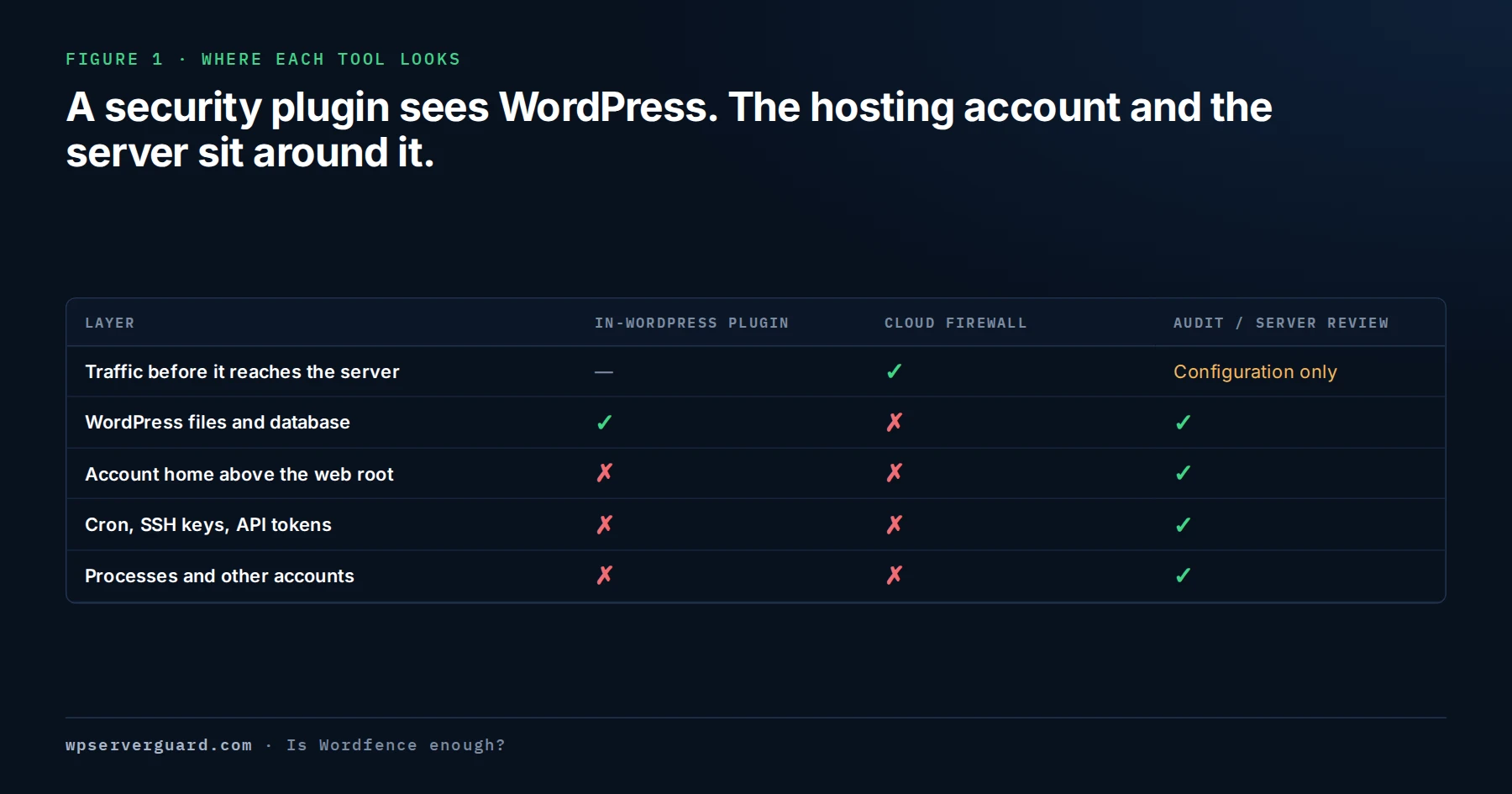
A plugin runs as the site’s PHP user and scans what it is built to scan: the WordPress installation. Some scanners can be widened to non-WordPress files under the site’s directory, but none of them audits the layers below.
Figure 1 · Where each tool looks
In the WHM case Wordfence correctly found 283 infected WordPress files; the backdoor sat in the account home, outside the layer any in-WordPress plugin reads.
Above the web root
The hosting account’s home directory sits above public_html. Hidden dot-directories such as ~/.config, ~/.cache and ~/.local are outside a WordPress scan by design, and a compiled binary there contains no PHP for pattern matching to find.
The process table
Security plugins do not inspect running processes, and on most hosts PHP is not permitted to. A process owned by a hosting user that presents itself as a kernel thread is invisible from inside WordPress.
System and user cron
A plugin can list WP-Cron events stored in the database. It cannot read user crontabs or /var/spool/cron, where a reinfection job usually lives. Checking needs shell access: crontab -l -u USER only reads.
Other accounts on the server
On a shared or reseller server, a neighbouring account with weak isolation can rewrite your files. A plugin on your site cannot see the neighbour, or test whether isolation holds.
Keys and API tokens
SSH authorized_keys, control-panel API tokens, deployment keys, and payment or shipping API credentials held in third-party dashboards survive every password change and every file cleanup. No plugin can tell you whether one was added or copied.
Backups and restore evidence
A plugin can confirm a backup job ran. It cannot prove a restore works, or tell you that backups stored inside the same hosting account share the site’s compromise.
Business logic
Whether a coupon can be stacked, a role holds a capability it should not, or a custom endpoint trusts client input is a judgement about the business, not a signature match.
Server hardening and isolation
PHP handler and open_basedir settings, CageFS or equivalent isolation, SSH and control-panel login policy, the host firewall, egress controls and patch level are server questions, answered with root access.
Wordfence found 283 infected files. The backdoor was elsewhere.
The clearest example on this site comes from a WHM/cPanel server carrying 261 cPanel accounts. One WooCommerce shop was being listed as malicious. Wordfence reported 283 infected files across several plugins and the active theme. ImunifyAV, running server-side, gave a comparable file-level picture. A full export of the site database came back clean — no injected rows, no hidden administrator, no obfuscated code.
All three results were accurate. Wordfence found real damage and described it correctly. None of them found the mechanism: a packed x86-64 ELF binary staged at ~/.config/htop/defunct in the account’s home directory, outside public_html, owned by the site’s own cPanel user — a gsocket remote-access backdoor with exactly the write access that had rewritten those files.
That is “is Wordfence enough?” in practice. Cleaning the 283 files would have produced a clean Wordfence result and left the thing that wrote them in place.
Wordfence vs a security audit: what each one answers
A plugin and an audit are not competing products. One runs continuously and answers known questions quickly; the other is a person answering the questions a tool cannot.
Question
Security plugin
Manual audit or server review
Is known malicious code in the WordPress files?
Yes — continuously, by signature and integrity check
Checked, then explained: how it got there and what wrote it
Is the login being attacked right now?
Yes — and it blocks and locks out
Reviews whether login protection, 2FA and access paths are adequate
Are installed plugins known to be vulnerable?
Yes — against the vendor’s vulnerability data
Validated against how the component is actually used and exposed
Who has administrator, hosting and SSH access?
WordPress users only
Every access path: panel, SFTP, SSH keys, API tokens, agencies
Is there persistence outside WordPress?
No
Home directory, cron, processes and neighbouring accounts, with root access
Would a restore actually work?
No
Backup separation and restore evidence reviewed
Is the business logic safe?
No
Roles, custom code, forms, checkout and APIs reviewed by hand
How to get more out of Wordfence or any security plugin
Much of a plugin’s value is lost in configuration and in alerts nobody reads. Fix that before adding anything.
Enable two-factor authentication for every administrator and editor, not only the site owner.
Use the firewall’s optimised mode where your host supports it, so it loads before WordPress rather than as an ordinary plugin.
Send alerts to someone whose job is to read them. Across several sites, route the findings to one place — the free WPSecureOps Connector forwards Wordfence scan results to a single dashboard.
Never allowlist or ignore a finding without writing down why. “Ignored” is how real detections end up forgotten.
Run one endpoint firewall and one scanner, not three overlapping ones.
Add a posture check alongside it. The free Lockora Security Audit plugin scores configuration and exposure, which a malware scanner does not measure.
After any cleanup, treat a clean scan as the start of verification, not the end of it.
Common questions about Wordfence and other security plugins
Is Wordfence enough for a small WordPress site?
Often, yes, as the plugin layer: with two-factor authentication on, alerts read, and updates applied promptly, it covers the attacks a small site usually sees. It does not tell you who has access, whether a backup restores, or how an infection got in.
Is Wordfence Premium worth it over the free version?
For a business or store, usually. Wordfence documents that free sites receive new firewall rules and malware signatures 30 days after paying customers, and the real-time IP blocklist is paid. On a hobby site that delay may be acceptable; on a site that takes payments it is a month of exposure to newly published attacks.
Wordfence or Sucuri — which is better?
They work at different layers. Wordfence is an endpoint firewall and scanner inside WordPress; Sucuri’s firewall is a cloud proxy that filters traffic before it reaches your server, backed by a cleanup platform. A cloud firewall in front and one endpoint plugin inside is a common and compatible pattern, provided the origin only accepts traffic from the proxy.
Should I run two security plugins at once?
Not two firewalls or two full malware scanners — they duplicate work, slow the site, and can conflict. Complementary tools are fine: a posture audit, an activity log, and a vulnerability feed each answer a different question from the firewall and scanner.
Wordfence says my site is clean. Can it still be hacked?
Yes. A clean scan means the files Wordfence read did not match what it knows. Malware can be cloaked, stored outside the WordPress installation, or run from cron or another account on the server. If something is still flagging the site, work out what that source saw before scanning again.
What is the difference between a Wordfence scan and a security audit?
A scan checks files against signatures and official versions, automatically. An audit is a person reviewing access, configuration, hosting controls, recovery readiness and business logic, and validating each finding by hand. The scan reports what is known to be wrong; the audit looks for what nothing is set up to detect.
Does a security plugin protect the server?
No. A plugin protects and scans the WordPress installation it runs in, as the site’s PHP user. It does not see other accounts, system cron, running processes, SSH keys or root-level configuration. If you run a VPS or a WHM/cPanel server, that layer needs a server review with root access.