Server sending spam: find the account and script that is sending it
The first sign is rarely the spam itself. It is a bounce storm, a queue of thousands of messages, a host abuse ticket, or the server’s IP on Spamhaus while every site looks normal. Until you know whether the sender is a stolen mailbox password, a PHP script planted in one account, or a legitimate form being abused, every fix is a guess. This guide shows how to find the sender with read-only Exim commands and the WHM and cPanel mail tools, how to stop it without destroying the evidence, and when to request delisting.
Prepared by G. Schad, WordPress and Linux security specialist
Large mail queue, bounces, abuse reports, or the server IP on a blacklist
Usual sources
A stolen mailbox password, a planted PHP mailer, or an abused form
First step
Identify the sender from the Exim logs and queue before deleting anything
Risk
Every account on the shared IP loses delivery, then the host suspends
What is happening
Why is my server sending spam?
On a cPanel server, almost all outbound mail passes through Exim, and Exim records who handed it each message — so unlike most compromises, outbound spam leaves a detailed log. The mail was either submitted over SMTP by a client logged in as a mailbox, or handed to Exim locally by a process running as a cPanel account, usually PHP. Telling those two paths apart is most of the diagnosis.
Our WHM/cPanel response guide lists “outbound spam or a blacklisted IP” among the symptoms that point above the site: the server’s address is on a block list whether or not any site looks infected. A shared IP is shared reputation. On a server carrying hundreds of accounts — the WHM server in our incident report held 261 — one account’s spam is every account’s delivery problem.
Compromised mailbox, PHP script or contact form: how to tell them apart
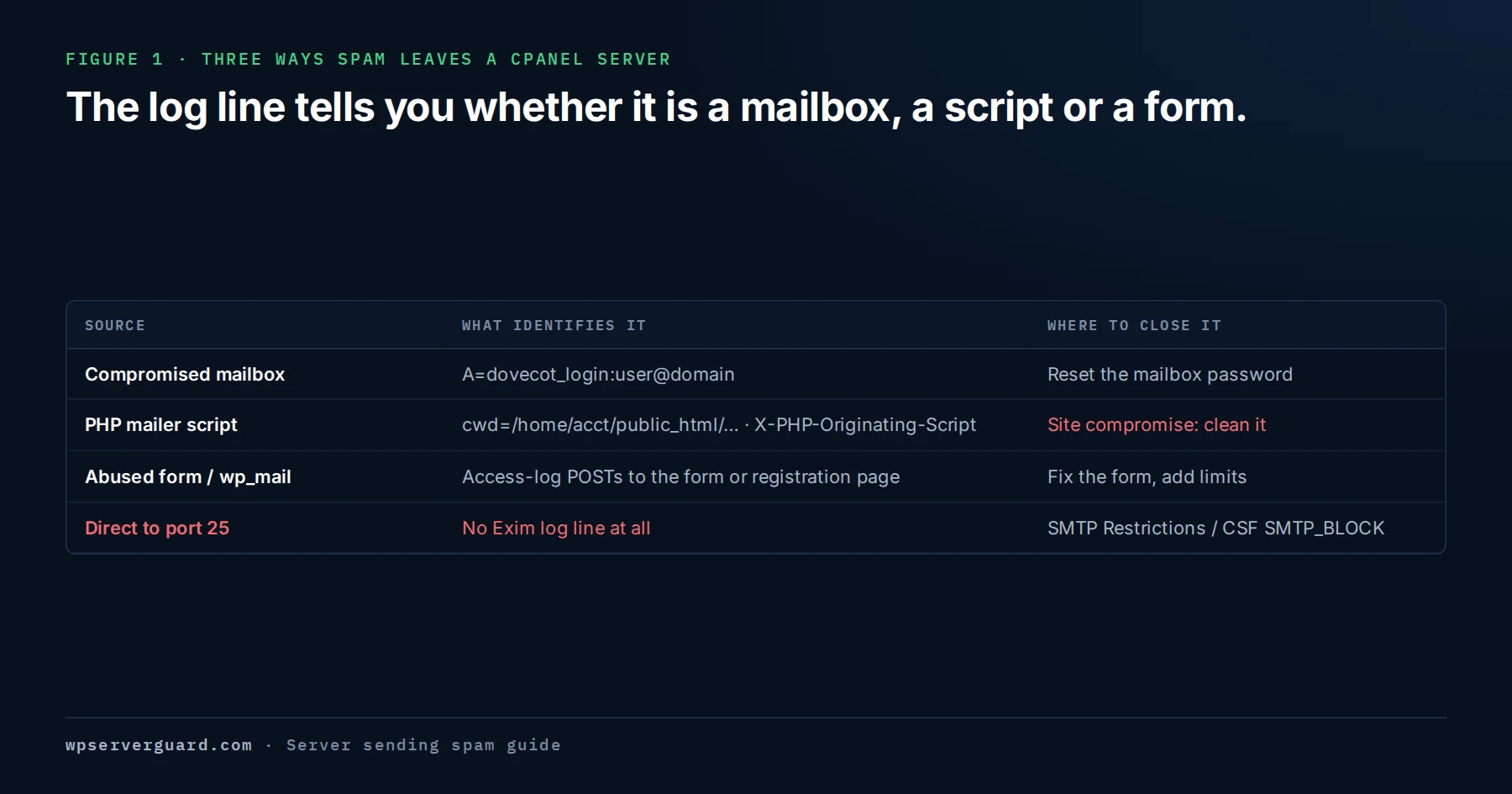
Each source leaves a different signature in /var/log/exim_mainlog and in the message headers. Identify which one you have before changing anything, because the fix for each is different.
Figure 1 · Three ways spam leaves a cPanel server
Signatures as they typically appear in exim_mainlog and message headers on cPanel; what is logged depends on the Exim configuration and cPanel version.
A compromised mailbox password
Someone has a real mailbox’s password and sends through the server’s authenticated SMTP, often from many IP addresses. The log shows A=dovecot_login: or A=dovecot_plain: and the mailbox name. No website is involved; cleaning WordPress changes nothing.
A compromised PHP script
A mailer uploaded into an account — often in wp-content/uploads, a plugin directory, or a file named to look like core — calls PHP mail() or the local SMTP port. The log shows the account’s local user and, for mail submitted through sendmail, a cwd= path inside the account. This is a site compromise.
An abused contact form or wp_mail
Nothing is hacked in the strict sense: a form, registration page, or “send a copy to yourself” option lets bots choose the recipient or insert their text. The mail goes out through WordPress’s own wp_mail, so the access log is what gives it away.
Rarer: relay misconfiguration or direct SMTP
Exim on cPanel is not an open relay by default, but relay and trusted-host settings can be widened by mistake. Malware can also skip Exim and connect straight to remote port 25 — the Exim logs look clean while the IP keeps getting listed.
Source
What exim_mainlog shows
What the headers show
Where to confirm
Compromised mailbox
A=dovecot_login:user@domain, P=esmtpsa, many different H= addresses
-auth_id with the mailbox name; no X-PHP-Originating-Script
Dovecot logins in /var/log/maillog; the mailbox’s password age
PHP script
U=cpaneluser P=local, and a cwd= path inside the account
X-PHP-Originating-Script naming an unfamiliar file
The file on disk and the access log for requests to it
Abused form or wp_mail
cwd= of the document root or wp-admin, the site’s own user
X-PHP-Originating-Script naming PHPMailer.php
POST requests to the form, admin-ajax.php or registration page
Direct SMTP bypass
Nothing, or far less than the volume reported
Not applicable — the messages never touched Exim
Outbound port 25 connections in ss -tnp, owned by a hosting user
Read-only checks
Exim commands to find what is sending spam
Run these as root over SSH. Every command below only reads the queue or the log; none of them deletes, freezes, or delivers anything. Paths are the cPanel defaults — verify them against your cPanel version, and use zgrep on rotated exim_mainlog files for older days.
01
Count the queue
exim -bpc prints the number of messages waiting. Thousands, or a number that climbs while you watch, means something is sending now.
02
See where the queue is going and who it is from
exim -bp | exiqsumm summarises the queue by destination domain. For the sender side, exim -bp | awk '/^ *[0-9]+[mhd] /{print $4}' | sort | uniq -c | sort -rn | head lists the envelope senders with the most queued messages.
03
List the message IDs for one sender
exiqgrep -i -f 'user@example\.com' prints only the IDs of queued messages from that sender (the argument is a regular expression). exiqgrep -c -f with the same pattern gives the count.
04
Read the headers of a sample message
exim -Mvh <message-id> prints the spool header file: the local user and uid that submitted it, an -auth_id line naming the mailbox for authenticated SMTP, and headers such as X-PHP-Originating-Script and cPanel’s X-Get-Message-Sender-Via. exim -Mvb <message-id> shows the body.
05
Find the directories scripts sent from
grep -o 'cwd=[^ ]*' /var/log/exim_mainlog | sort | uniq -c | sort -rn | head -20 counts the working directory recorded for each message handed to Exim’s sendmail binary. Ignore cwd=/var/spool/exim (Exim’s own queue runs); a directory inside one account sending thousands of messages is your lead.
06
Find the mailboxes that authenticated to send
grep -o 'A=dovecot_[a-z]*:[^ ]*' /var/log/exim_mainlog | sort | uniq -c | sort -rn | head -20 counts messages per authenticated mailbox. For a suspect mailbox, grep -F 'A=dovecot_login:user@example.com' /var/log/exim_mainlog | grep -oE '\[[0-9a-f.:]+\]' | sort | uniq -c | sort -rn shows the client IPs it logged in from.
Without SSH, the same questions can be answered from the interface. Menu names and locations change between cPanel versions — verify these against yours.
Tool
Where
What it answers
View Mail Statistics Summary
WHM › Email
Which domains and users sent the most mail over a period — the fastest way to spot the account that is out of line.
Mail Queue Manager
WHM › Email
What is queued now, from which sender, to whom. You can open a message to read its headers and body before acting on it.
Mail Delivery Reports
WHM › Email
Server-wide delivery history, searchable by sender, recipient, and result.
Track Delivery
cPanel › Email
The same history, limited to the account’s own domains — the tool for an account owner without WHM.
The script
Find which PHP script is sending mail: X-PHP-Originating-Script
When PHP’s mail.add_x_header setting is on, every message sent through mail() carries a header of the form X-PHP-Originating-Script: 1005:mailer.php — the uid of the account and the file name (not the full path) of the PHP file that called mail(). getent passwd 1005 maps the uid to an account. If the setting is off, it can be enabled per PHP version in WHM › MultiPHP INI Editor, for mail sent after the change.
An unfamiliar name, or a file in wp-content/uploads, is a planted mailer. PHPMailer.php means the message went through WordPress’s wp_mail(), driven by a form, a plugin, or injected code. The cwd= path in the Exim log is the working directory of the request — usually the directory of the requested script, not the file that sent the mail. Together they narrow the search to one account and one entry point.
Then go to the access log for the domain — on cPanel under /etc/apache2/logs/domlogs/ or /usr/local/apache/domlogs/, depending on version — and look at requests that line up with the spam timestamps: grep 'POST' <domain-log> | awk '{print $7}' | sort | uniq -c | sort -rn | head shows which URLs are receiving the most POST requests. A mailer called from many IPs, or a form endpoint hit thousands of times, confirms the source.
wp_mail spam: contact forms, registrations and hacked WordPress sites
When the header says PHPMailer.php, the question becomes what made WordPress send.
Registration and account emails
Open registration, or WooCommerce account creation, sends a welcome email to any address a bot submits — with spam text from the name field riding along.
Forms that copy the sender
A “send me a copy” option, or a submitted field used in the headers, lets a bot choose the recipient. The form works as configured; the configuration is the problem.
Injected code calling wp_mail()
A compromised plugin, theme file, or must-use plugin can send through WordPress’s own mail function, so the header looks legitimate and the evidence comes from a malware review of the site.
Stolen SMTP plugin credentials
SMTP plugins store the mailbox password in the database. If the site was compromised, that password may be used from elsewhere — which looks like a compromised mailbox, not a script.
How to stop outbound spam without destroying the evidence
The order matters. Stop new mail leaving first, preserve what is queued, close the source, and only then clear the queue.
01
Preserve samples and logs
Save exim -Mvh and exim -Mvb output for several messages from each suspect sender to files outside the queue, and copy /var/log/exim_mainlog, /var/log/maillog, and the account’s access logs. It is the record you will need for the host, the blacklist, and the cleanup.
02
Suspend or hold outgoing email for the account
WHM can suspend or hold outgoing email for a whole cPanel account; the API calls are whmapi1 suspend_outgoing_email user=USERNAME and whmapi1 hold_outgoing_email user=USERNAME, and where the option sits in the interface varies by version. A cPanel user can do the same for one mailbox under Email Accounts › Manage. Hold keeps new messages in the queue; suspend stops them being sent. Verify both against your cPanel version before relying on them.
03
Freeze what is already queued
exim -Mf <message-id> freezes a message so Exim stops trying to deliver it, without deleting it. exiqgrep -i -f with the sender pattern, piped to xargs exim -Mf, freezes one sender’s messages in bulk.
04
Close the source
For a mailbox, change its password and check for forwarders and filters the attacker added. For a script, keep a copy, remove it, and investigate the account as compromised. For a form, add a CAPTCHA or rate limit, remove any copy-to-sender option, and close unused registration.
05
Only then clear the queue
With samples preserved and the source closed, remove that sender’s spam — exiqgrep -i -f with the sender pattern, piped to xargs exim -Mrm — or use Mail Queue Manager. Leave legitimate mail alone.
06
Block the paths that bypass Exim
WHM › Security Center › SMTP Restrictions (or CSF’s SMTP_BLOCK) stops hosting users connecting to remote mail servers directly. A per-domain hourly email limit in WHM › Tweak Settings caps the next incident.
Server IP blacklisted: Spamhaus, SpamCop and Barracuda delisting
Check the server’s outbound IP on each list’s own lookup page, not only on aggregator sites, and note the reason and date. Spamhaus runs several lists with different removal processes, and its lookup page explains which applies. SpamCop listings are driven by recent reports and are designed to expire on their own once the reports stop. Barracuda has its own removal request form. Large mailbox providers keep their own reputation systems and postmaster pages. SORBS, which older guides mention, has shut down.
Request removal once, after the source is closed and the queue is clear, and say briefly what was found and what was changed. Each list sets its own review time; none of them can be hurried, and a relisting after a premature request is harder to undo than the original listing.
How do I find which account is sending spam on my cPanel server?
Confirm the queue is abnormal with exim -bpc, then count senders in /var/log/exim_mainlog. A=dovecot_login: entries point to a mailbox; cwd= paths and U= local users point to a script. In WHM, View Mail Statistics Summary shows the same picture without a shell.
How do I find which PHP script is sending mail?
Read a queued message’s headers with exim -Mvh. With mail.add_x_header on, X-PHP-Originating-Script gives the account uid and the file that called mail(). The cwd= path gives the directory, and the access log shows which requests triggered it.
My WordPress site is sending spam. Does that mean it is hacked?
Not always. A contact form or registration page abused by bots sends spam without any file being changed. An unfamiliar file in the X-PHP-Originating-Script header, a mailer in wp-content/uploads, or mail sent when no form was being submitted does mean the site is compromised, and it needs a full cleanup rather than a deleted file.
Should I just delete the mail queue?
Not first. Preserve a few messages’ headers and bodies and copy the logs, suspend or hold outgoing mail for the account, and close the source. Then clear the spam. Deleting first removes the evidence and does nothing about whatever is still sending.
How do I get my server IP removed from Spamhaus?
Close the source, clear the queue, and confirm no more spam is leaving. Then use the Spamhaus lookup page for the IP, which explains the listing and the removal route. Review times are set by the list.
The Exim logs look normal but the IP keeps getting listed. What now?
Look for mail that bypasses Exim: a process owned by a hosting user holding outbound connections to port 25, visible with ss -tnp 'dport = :25'. Check that SMTP Restrictions or CSF’s SMTP_BLOCK is enabled. Also confirm which IP is listed — on servers with several addresses, outbound mail may not use the IP you are checking.
Can one hacked account get the whole server blacklisted?
Yes. Outbound mail from every account usually leaves from the same IP, so one mailbox or mailer damages delivery for all of them — which is why outbound spam is a server symptom, not a site one.
Choose the response path
The containment plan should match the size of the incident.
One WordPress site sending spam
Remove the mailer and close the way it got in.
Best when the spam traces to one site — a planted script, injected code calling wp_mail(), or stolen SMTP plugin credentials — and the rest of the server is clean.
Best when the server IP is listed, more than one account is involved, or mail is leaving without passing through Exim — and the answer has to cover the whole server.