30+ affected sites
The same infection pattern appeared across WordPress and WooCommerce installations in one operating estate.
Sample incident report · ClickFix
This plain-English sample explains why cleaning a serious WordPress infection takes far more than running a security scan. More than 30 WordPress and WooCommerce sites were affected across files, the database, the active theme, and PHP settings.
Published Last reviewed
Free PDF · no email address, form, or account required
Start here · plain English
More than 30 WordPress and WooCommerce sites contained the same ClickFix-style infection pattern. A visitor might see only one fake verification screen, but the code behind it was spread across several parts of each website.
Some malicious code was hidden in PHP files. More was stored in the WordPress database. Another piece was called from the active theme, while a PHP setting could load a malicious file before WordPress even started.
That is why deleting one suspicious file or clicking “remove” in a scanner is not enough. If any one of the other hiding places survives, it can bring the malicious behavior back.
The same infection pattern appeared across WordPress and WooCommerce installations in one operating estate.
Malicious behavior was connected to PHP files, database values, the active theme, and PHP startup settings.
Affected sites could show visitors a fake verification flow designed to make them run a malicious command.
The evidence did not justify blaming one plugin, password, hosting account, or administrator.
Investigation at a glance
The full report follows. This is the one-page version for a reader who needs the method and the evidence standard before the detail. Dates are withheld to protect the client; the sequence is the review as it was structured.
Visitor-facing fake verification behavior was observed on affected sites. The rendered responses were retained as evidence of the delivery pattern.
WordPress roots, uploads, cache, mu-plugins, theme directories, and recently modified files were reviewed for unexpected or modified PHP. Obfuscated loaders were found and preserved with timestamps and hashes.
Options records, especially autoloaded values, were exported and examined. Base64-encoded script content and loader material were found in affected records.
The active theme’s functions.php and the site and parent .user.ini files were examined. An unauthorized theme call and an auto_prepend_file startup directive were found.
Artifact structure, option names, and configuration changes were compared across the estate. The repetition across more than 30 sites is why the incident is treated as one coordinated compromise rather than many.
Shared components, identities, hosting boundaries, and the logs still available were examined. They did not uniquely identify the first access path, and the report says so rather than naming one.
| Finding | Status | Basis |
|---|---|---|
| Obfuscated PHP loaders in multiple installations | Confirmed | Retained files showing high-entropy strings, decoder patterns, and indirect execution logic |
| Base64-encoded loader content in WordPress options records | Confirmed | Affected option values containing encoded script content and loader material |
| Unauthorized call in the active theme’s functions.php | Confirmed | An automated call referencing the malicious chain during normal theme execution |
| auto_prepend_file persistence through .user.ini | Confirmed | A startup directive referencing an injected component before application processing |
| Sites served a ClickFix-style lure to visitors | Confirmed | Rendered responses matching a fake verification or recovery flow |
| One shared access path behind the whole estate | Likely, moderate confidence | Repetition across sites; no single artifact proves it |
| The initial access vector | Undetermined | Available logs and artifacts did not settle it |
| Visitor devices executed the pasted command | Not established | Requires endpoint evidence the website review cannot supply |
Scan versus cleanup
Wordfence is useful for detecting known malicious patterns, changed files, suspicious code, and dangerous content in WordPress options. Those alerts can provide an excellent starting point.
But a scan result is a snapshot, not proof that the whole environment is trustworthy. Running the scanner alone does not preserve evidence, determine how access was obtained, rebuild every affected component, rotate hosting credentials, inspect shared infrastructure, or retest more than 30 sites after cleanup.
This comparison refers specifically to running a scanner by itself. It does not describe a managed incident-response service in which security professionals investigate and clean the environment.
Security scan
Complete incident response
A clean scan is useful evidence. It is not, by itself, a guarantee that a compromised WordPress or WooCommerce site is safe again.
Visual infection map
The infection was resilient because it did not depend on one file. Each layer offered another way to store, call, or reload the malicious behavior.
Hidden loaders and encoded server-side logic on disk.
Base64-encoded script content stored in options records.
An unauthorized call ran during normal WordPress page handling.
A startup instruction could load a malicious file before WordPress.
Why the infection appears to come back
The visible symptom is identified.
The page may look normal for a while.
The database, theme, .user.ini, or attacker access remains.
A later request, restart, cache refresh, or deployment loads it again.
Terminology and classification
ClickFix is a social-engineering technique that presents a fake error, CAPTCHA, or verification step and attempts to persuade a person to copy and run a command. In this incident, compromised WordPress sites acted as part of the delivery surface for that visitor-facing behavior.
The report therefore uses “ClickFix-style infection” for the observed website delivery pattern and describes the PHP and database artifacts separately as malicious loaders, injections, and persistence mechanisms. This avoids treating ClickFix as the name of a single server-side payload.
Scope and limitations
| Area | Evidence considered | Boundary |
|---|---|---|
| Affected website estate | WordPress files, database records, active theme code, PHP configuration, and rendered responses. | Client names, domains, IP addresses, credentials, hashes, and attacker infrastructure are redacted. |
| Malware execution chain | References between loaders, encoded option values, theme invocation, and PHP startup behavior. | Live payload code and operational command strings are intentionally omitted. |
| Initial access | Shared components, identities, hosting boundaries, and available logs. | The original entry vector is not claimed without sufficient historical evidence. |
| Visitor impact | Website-side delivery behavior and potential exposure. | Visitor command execution, endpoint infection, or data theft requires endpoint evidence and was not established by the website review alone. |
Observed execution chain
Diagram · One page view, start to finish
Where the ClickFix chain had a chance to run on each request.
auto_prepend_file in .user.ini
PHP reads the per-directory .user.ini and parses the named file before index.php runs.
wp-content/themes/<theme>/functions.php
An automated call connected to the chain runs during normal WordPress request handling.
wp_options
Encoded script fragments and loader data persist in options records, outside every theme and plugin file.
Remove one layer and any of the other three can put the chain back: the reason a single-file cleanup comes back.
Several installations contained unexpected or modified PHP files whose meaningful behavior was concealed through layered encoding, generated strings, and obfuscated control flow.
Base64-encoded script fragments and related loader data were present in affected WordPress options records, allowing malicious content to persist outside the visible theme and plugin files.
The active theme’s functions.php contained an automated call connected to the malicious chain, giving it an execution opportunity during normal WordPress request handling.
A .user.ini directive caused an injected PHP component to load automatically before normal application handling, creating a persistence path outside the ordinary WordPress lifecycle.
When the configured conditions matched, the compromised site could present a fake verification or recovery flow intended to persuade a visitor to execute a command on their own device.
Because multiple layers could reintroduce or reload the behavior, a single-file cleanup could leave the environment capable of reinfection.
Redacted visual evidence
The compromised page presented a familiar-looking verification flow rather than an obvious malware warning. Its purpose was to transfer execution to the visitor by persuading that person to open a system interface and paste a command.
The reconstruction below preserves the observable layout and social-engineering pattern while removing the client domain, command content, attacker infrastructure, and other operational details.
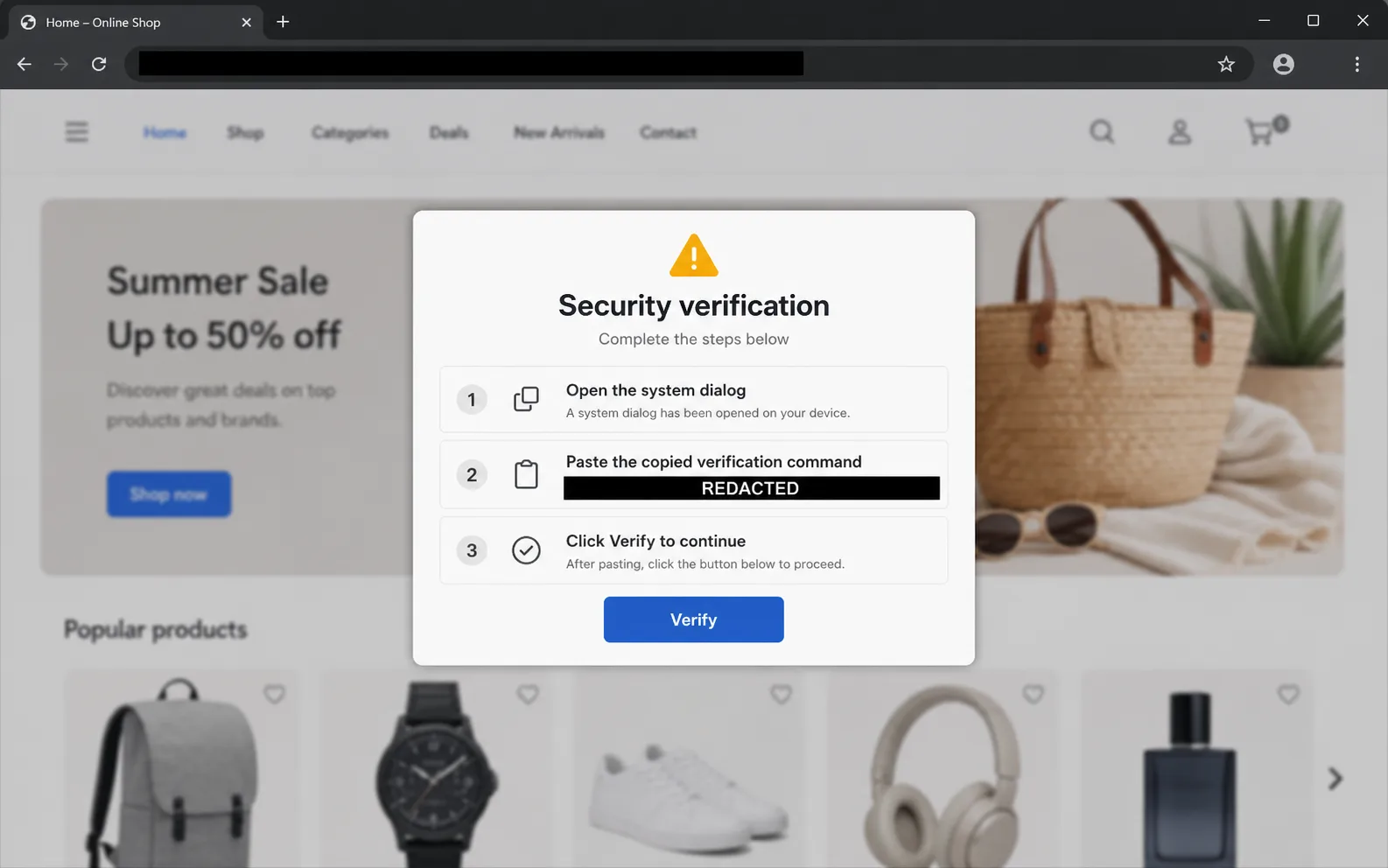
Sanitized reconstruction—not original client evidence. The domain and command are deliberately redacted; no executable content is included.
Critical finding IR-01
The affected estate should be treated as a coordinated compromise rather than 30 isolated website infections. Repeated artifact structure across sites, multiple execution layers, and the use of configuration outside WordPress all raise the likelihood that the attacker had access to a shared control point, reusable credential, common deployment path, or shared vulnerable component.
That pattern increases both cleanup complexity and reinfection risk. A site cannot be considered restored merely because its public pages stop displaying the malicious behavior at one moment in time.
Public delivery of a command-execution lure, arbitrary server-side PHP execution, and fleet-wide persistence create material risk to visitors and site owners.
More than 30 WordPress and WooCommerce sites plus any shared hosting, deployment, identity, or management layer within scope.
High while any loader, encoded option, modified theme file, startup directive, or shared access path remains available.
Visitor malware delivery, site manipulation, credential theft, reinfection, service disruption, reputation damage, and search or browser warnings.
High for compromise and observed persistence; moderate for a shared access path; undetermined for the exact initial vector.
The finding remains open until every site and the relevant shared control plane pass the defined validation checks.
Evidence matrix
| Location | Sanitized observation | Security significance | Assessment |
|---|---|---|---|
| Multiple PHP files | Unexpected or modified files contained high-entropy strings, decoder patterns, and indirect execution logic. | Concealed server-side loaders could execute or reconstruct malicious behavior. | Confirmed |
| WordPress options table | Affected option values contained base64-encoded script content and related loader material. | The database provided persistence independent of a visible theme or plugin file. | Confirmed |
| Active theme functions.php | An unauthorized automated call referenced the malicious chain during normal theme execution. | Ordinary front-end requests could activate the loader. | Confirmed |
| .user.ini | A PHP startup directive referenced an injected component before normal application processing. | The malicious file could load even when WordPress-level hooks were removed. | Confirmed |
| Rendered website response | Conditional visitor-facing behavior matched a fake verification or recovery flow. | The compromised site could serve as a ClickFix delivery surface. | Confirmed |
| Initial-access evidence | Available artifacts did not uniquely identify the first successful access path. | Attribution to one plugin, account, or host would be speculative. | Undetermined |
MITRE ATT&CK mapping
The mapping below uses MITRE ATT&CK vocabulary to describe behavior, not to identify a threat actor or claim evidence that was not retained. Technique confidence is stated separately from the underlying incident finding.
The fake verification flow attempted to persuade a visitor to paste and execute a command. The website-side lure was observed; successful execution on a visitor endpoint was not established.
Unexpected PHP components provided server-side execution and persistence. This sub-technique applies only where retained evidence supports a web-accessible backdoor or command interface; an obfuscated loader alone is not automatically a web shell.
Theme request handling and PHP startup configuration created automatic execution opportunities. ATT&CK does not define a PHP auto_prepend_file sub-technique, so the parent technique is used with that limitation stated.
Layered encoding, generated strings, and concealed control flow made the PHP and database-hosted content harder to understand and detect.
Technical interpretation
Base64 is encoding rather than encryption. Its presence alone is not proof of malware, because legitimate software may store encoded values. Here it became relevant because the decoded structure correlated with unauthorized PHP loaders, theme changes, and visitor-facing behavior across multiple sites.
WordPress stores settings and extension data in its options table, so malicious content placed there can survive replacement of a theme file and can be retrieved during later requests. The database therefore required targeted review and cleanup rather than a file-only malware scan.
PHP can be configured to parse a named file automatically before the requested script. A malicious .user.ini instruction at the site or parent-directory level can therefore run before WordPress, bypass theme-focused cleanup, and affect multiple applications under the same directory hierarchy.
Impact assessment
A successful ClickFix lure can persuade a visitor to run a command that downloads or launches malware on the visitor’s workstation.
Fake verification behavior can interrupt shopping journeys, increase abandonment, and undermine confidence in checkout and account pages.
Unauthorized PHP execution can alter content, users, configuration, redirects, scheduled tasks, and other application behavior.
A surviving shared credential, parent configuration, deployment artifact, or common component can reintroduce the infection after local cleanup.
Malicious behavior may lead to browser warnings, security-vendor blocklisting, search visibility loss, complaints, and brand damage.
Uncoordinated edits or restores can destroy timestamps and logs needed to determine how access was obtained.
Root-cause assessment
A similar infection across more than 30 sites makes a shared cause more plausible than unrelated compromises happening at the same time. That is a prioritization signal, not proof of one specific vector.
The investigation should compare timestamps and access records across the full estate before naming the root cause. Restoring clean files without closing the common access path would leave every site at risk of reinfection.
Check your own site · IOC triage
This public report does not publish client-specific hashes, filenames, domains, or payloads. Instead, the checks below describe indicator classes that site owners and administrators can compare with their own environment without assuming that every encoded value or changed file is malicious.
Preserve a backup, timestamps, logs, and representative artifacts before changing anything. If a visitor-facing lure is active, restrict public delivery first and investigate from a trusted administrative device. Never paste a command supplied by the suspicious page.
| Signal | Where to check | What raises concern | First safe action |
|---|---|---|---|
| Fake verification or error flow | Public pages in a clean browser profile, representative referrers, mobile and desktop views, and response/network captures. | The page asks a visitor to open Run, Terminal, PowerShell, or another system interface and paste a command. | Do not interact with the lure. Capture the URL and screen, restrict delivery, and begin incident handling. |
| Unexpected PHP | WordPress root, uploads, cache, mu-plugins, theme directories, drop-ins, and recently modified files. | PHP where executable code is not expected, high-entropy strings, indirect function calls, or unexplained changes from trusted packages. | Record paths, timestamps, ownership, and hashes; compare with trusted sources before removal. |
| Suspicious option values | WordPress options records, especially autoloaded values and records referenced by unfamiliar code. | Long encoded blobs, injected script markup, unknown external resources, or values that correlate with the observed lure. | Export the affected rows and database before decoding or editing; validate context to avoid false positives. |
| Theme invocation | Active theme functions.php and custom include paths. | Unapproved remote calls, dynamic includes, decoding followed by execution, or references to unfamiliar option names and files. | Diff against the known-good theme and preserve legitimate customizations separately. |
| PHP startup persistence | Site and parent .user.ini, php.ini, PHP-FPM pool configuration, and effective runtime settings. | Unexpected auto_prepend_file or auto_append_file directives, particularly when they reference hidden or recently created PHP files. | Document the effective configuration and parent inheritance before removing the unauthorized directive. |
| Identity or scheduled persistence | Administrators, application passwords, sessions, SSH/SFTP keys, control-panel users, WP-Cron, system cron, and deployment automation. | Unknown accounts or keys, unexplained privilege changes, unfamiliar scheduled tasks, or access continuing after password rotation. | Revoke unknown access, rotate affected secrets from a trusted device, and retain the audit trail. |
| Cross-site repetition | Other sites under the same host, user account, deployment workflow, management agent, or backup source. | Matching artifacts, timestamps, option names, loader structure, or configuration changes across more than one site. | Treat the shared control plane as part of the incident; do not declare sites clean independently. |
Containment and eradication
Confirm what is malicious and how widely it appears.
Stop visitors receiving the lure and protect evidence.
Remove malicious files, database values, theme calls, and PHP settings.
Patch the entry path, rotate credentials, and isolate sites.
Prove every site stays clean after normal activity resumes.
Capture timestamps, hashes, logs, database exports, configuration files, and representative malicious artifacts before destructive cleanup.
Temporarily restrict affected sites, block confirmed attacker infrastructure where appropriate, and prevent visitors from receiving the malicious flow.
Rotate control-panel, SSH, SFTP, database, WordPress, deployment, API, and CDN credentials; revoke sessions and remove unknown keys.
Replace WordPress core, plugins, and themes from verified sources. Do not rely on manually deleting only the visible encoded lines.
Back up the database, identify the unauthorized options records, remove the malicious values in a controlled transaction, and verify application behavior.
Restore functions.php from a known-good source and remove unauthorized .user.ini directives, including inherited configuration in parent directories.
Patch or remove vulnerable shared components, correct isolation and permissions, and address the access path supported by the available evidence.
Validate each site independently, then monitor the common environment long enough to cover cache expiry, scheduled execution, deployments, and normal traffic.
Per-site remediation checklist
Fleet recovery priorities
| Window | Priority actions | Exit condition |
|---|---|---|
| 0–4 hours | Preserve evidence, restrict malicious delivery, identify shared infrastructure, revoke exposed sessions, and establish one incident owner. | Visitors no longer receive the malicious flow and evidence needed for investigation is retained. |
| 4–24 hours | Rotate shared access, remove all confirmed persistence layers, restore trusted application files, and patch verified urgent exposure. | Every known execution path is removed and access used for recovery is trusted. |
| 2–7 days | Complete per-site validation, review logs and identities, improve isolation, test backups, and monitor for reappearance. | All sites pass the retest matrix and no new indicators appear through normal traffic and scheduled activity. |
| Within 30 days | Address architectural causes, separate client accounts, harden deployment and secrets management, document response ownership, and conduct a lessons-learned review. | The common control plane has measurable preventive and detective controls. |
Retest protocol
| Control | Pass condition | Evidence retained |
|---|---|---|
| Filesystem integrity | No unauthorized PHP loaders remain; core and packaged components match trusted sources; approved custom code is reconciled. | Hash comparison, exception list, and reviewed file inventory. |
| Database integrity | No malicious encoded options, external loader references, or unauthorized autoloaded records remain. | Sanitized before-and-after option inventory and reviewer notes. |
| PHP startup path | Site and parent .user.ini or related configuration contain no unauthorized prepend or append behavior. | Configuration inventory and effective-runtime verification. |
| Theme execution | functions.php and related theme entry points contain only approved code and no references to removed loaders. | Trusted-source comparison and custom-change review. |
| Rendered behavior | Representative public, account, cart, checkout, and administrative routes return expected content without the ClickFix flow. | Controlled browser captures, response review, and network-request summary. |
| Identity and persistence | No unknown administrators, application passwords, sessions, cron events, deployment keys, or control-panel accounts remain. | Account and scheduled-task review with revocation record. |
| Observation period | No indicators recur after caches expire, PHP workers restart, cron runs, deployments execute, and normal traffic resumes. | Monitoring log and dated final retest status. |
Detection and prevention
Baseline application packages and alert on PHP changes in themes, uploads, mu-plugins, root files, and other executable paths.
Track suspicious changes to autoloaded options, injected scripts, unfamiliar external domains, and unusually encoded values.
Alert on .user.ini, php.ini, .htaccess, web-server, cron, and PHP pool changes, including parent-directory inheritance.
Use separate system users and credentials per client or site group, least privilege, MFA, and controlled deployment identities.
Retain control-panel, SSH, SFTP, web, WordPress, WAF, CDN, database, and deployment logs long enough to investigate delayed discovery.
Teach staff and customers that a website should never instruct them to open a run dialog or terminal and paste an unknown command.
Conclusion
This incident cannot be closed by deleting one obfuscated file or removing one visible browser script. The filesystem, WordPress database, active theme, PHP startup path, identities, shared infrastructure, and recovery sources all require a documented trust decision.
The most important unresolved question is the common access path. Until it is identified or the plausible shared paths are neutralized, the fleet remains exposed to reinfection even when individual sites appear clean.
This sample intentionally withholds client identifiers, attacker infrastructure, live payloads, and executable commands. A client report would include controlled evidence references, ownership, timestamps, remediation status, and a signed-off retest record for each affected asset.
Choose the response path
One WordPress site infected
Best for a site owner seeing redirects, fake verification screens, unknown administrators, malware warnings, or reinfection after an earlier cleanup.
Agency, host, or 30-site fleet
Best when several sites share hosting, deployment, credentials, management tooling, backups, or the same suspicious artifacts.