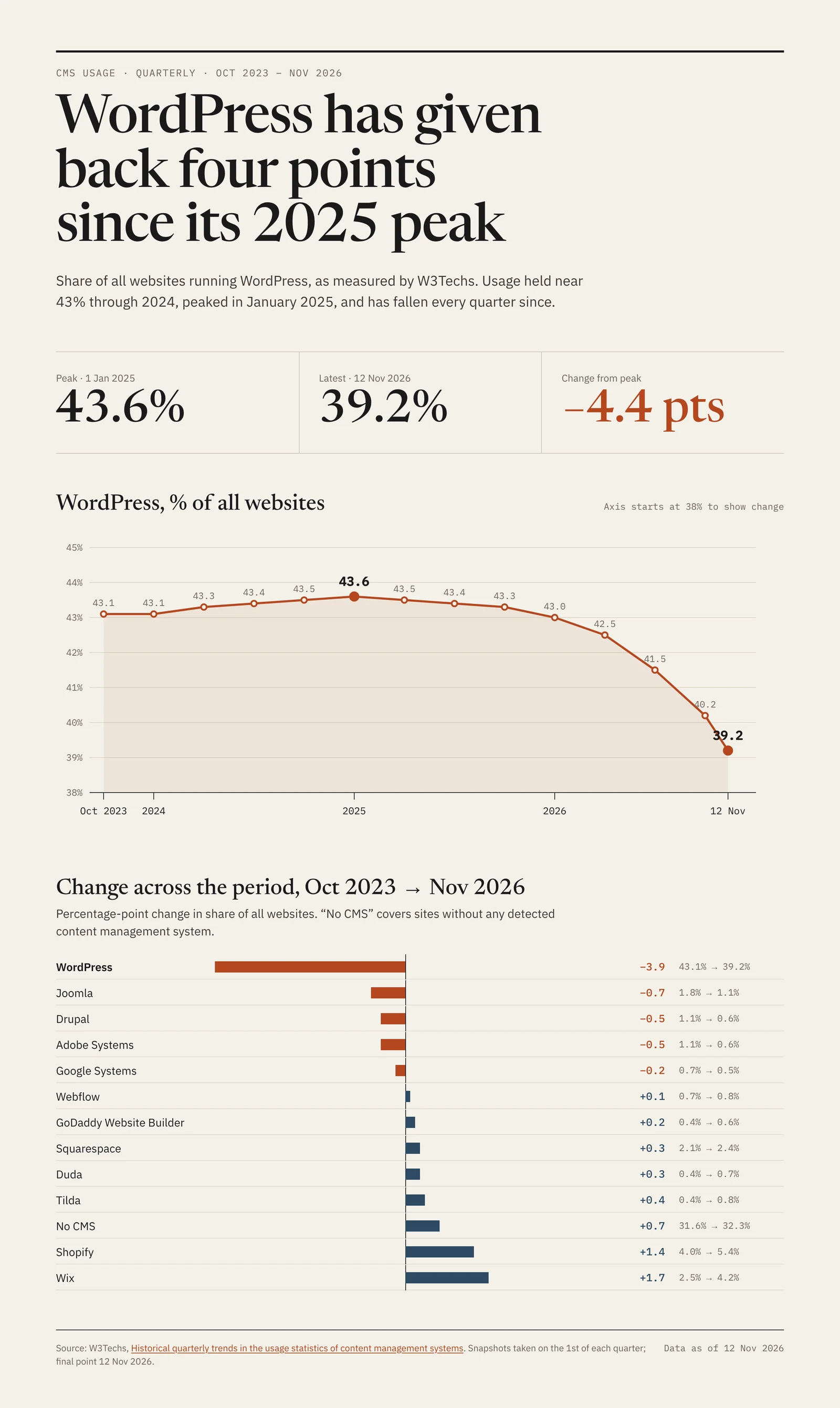
From where we sit, the practical question is whether any of this changes the risk to a site that runs WordPress. It does not, in either direction. Attackers do not choose targets from a market-share chart. They scan for a specific vulnerable plugin, theme or Core version across every address that answers, and a plugin with a million active installations is exactly as attractive at 39% as it was at 43%. Nothing in the weekly briefings on this site, the Core update-window flaw, the exploited plugin list, the PHP and kernel chains underneath, depends on WordPress’s share of the web.
The same W3Techs page carries a figure that matters more to an operator than the headline. Of the sites it identifies as WordPress, 69.0% are on version 7, 24.3% on version 6, 4.6% on version 5, 1.9% on version 4 and 0.2% on version 3. Nearly a third of detected WordPress sites are a major version or more behind, and 6.7% are on version 5 or older. Whatever is happening to the total, that is the population in which most compromises start.
There is one way a declining share could raise risk over time, and it is worth watching without overstating: ecosystems that shrink tend to accumulate abandoned software. Plugins whose authors move on stop receiving fixes long before their installations disappear. That is already the most common reason we find an unpatched flaw on a site, and it needs no market trend to be a problem today. The defence is the same as ever: know what is installed, remove what is unmaintained, and do not rely on an update that will never come.
If you are staying on WordPress
Nothing here is a reason to move. Keep Core, plugins, themes and the PHP beneath them current, remove plugins that have had no release in a year or more, and check that every administrator account is one you created. The share figure changes none of those tasks.
If you run sites for clients
Expect the number to come up in conversations. The accurate answer is that one survey shows a four-point fall in share with no established cause, that WordPress remains the largest platform by a wide margin, and that the security of a given site depends on how it is maintained, not on how many others use the same software.
If you are hiding the fingerprint
Removing the generator tag and version strings keeps a site out of some surveys and some lazy scans. It does not stop a scanner that requests a known vulnerable plugin path directly, which is how most mass exploitation works. Treat it as tidiness, not protection.
If you are moving away
The old installation is the risk, not the new platform. A WordPress site that has been replaced but not removed keeps running, stops being updated, and stays reachable. The next section is the list for that.