WordPress security this week: from patching to incident response
The work this week moves from updating WordPress to finding out what got in before the update. The Core file-inclusion flaw fixed in 7.1.2 on 22 September has gone from probing to real attempts at remote code execution, cPanel fixed a flaw on every supported branch that ends in commands running as root, and six plugins shipped critical or high-severity fixes. This briefing covers what changed in the week to 5 October, the indicators to search for, and the actions in priority order.
Prepared by G. Schad, WordPress and Linux security specialist
7.1.2, released 22 September — no newer release as of 5 October 2026; 7.2 is due 8–10 December
This week in one minute
The short version: what changed in the week to 5 October
If you read one section, read this one. Last week the urgent job was getting every site onto WordPress 7.1.2. This week the urgent job is checking whether anything got in before that update landed — because the flaw it fixes is now being used to run code on servers, not just to probe them.
The hosting layer had a busy week too. A login on a cPanel server can now be the starting point of an attack on the server itself: through the Multilang Adminbin flaw fixed on 29 September, which needs only a low-privileged account, or, on CloudLinux 7h and 8, through a kernel bug that an ordinary hosting account can reach as shipped. On a shared server, that turns one hacked WordPress site into everybody’s problem.
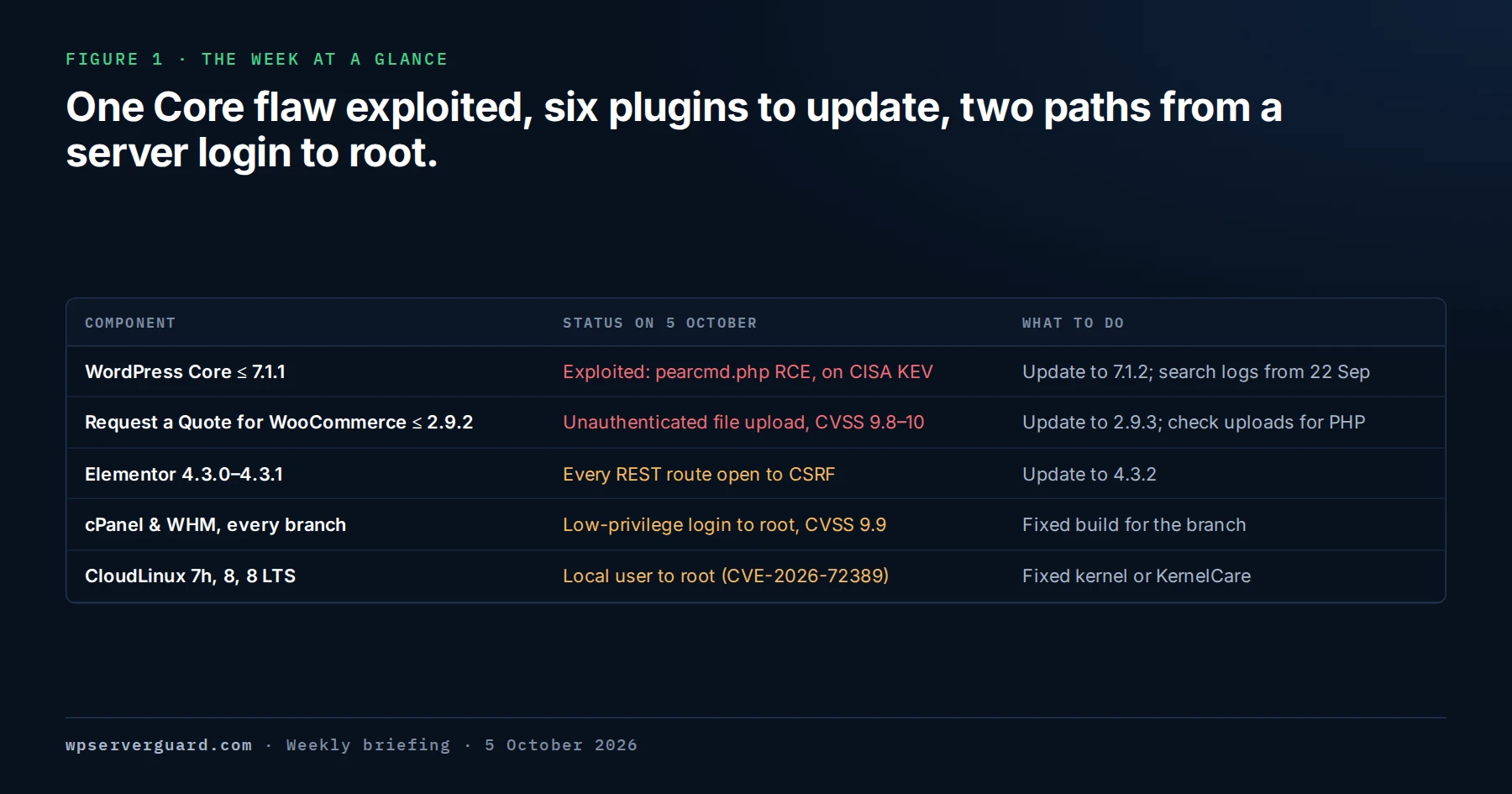
Figure 1 · The week at a glance
The five items that need action in the week to 5 October 2026: a Core flaw exploited in the wild, the two most urgent plugin updates, and two flaws that let a low-privileged login on a server reach root.
WordPress Core · CVE-2026-87902
The unauthenticated file-inclusion flaw fixed in 7.1.2 is now being chained to pearcmd.php to write and run PHP wherever the conditions allow. CISA added it to its Known Exploited Vulnerabilities catalog on 25 September.
Plugins · six to update
Request a Quote for WooCommerce 2.9.2 and earlier lets anyone upload a file without logging in. The vendor fixed it in 2.9.3 on 26 September, although Patchstack’s database still listed no fix on 5 October. Five other plugins have critical or high-severity fixes.
cPanel and WHM · root
Three critical fixes shipped on 29 September for every supported branch. The worst, CVE-2026-93698 (CVSS 9.9), lets a low-privileged login run commands as root through the Multilang Adminbin.
WordPress Core release
No new version this week. 7.1.2 is still the latest release and the only maintained 7.1 version. No 7.1.3 has been announced; 7.2 is scheduled for 8–10 December.
WordPress Core · CVE-2026-87902
CVE-2026-87902: from probing to real code-execution attempts
CVE-2026-87902 is an unauthenticated path traversal in the way WordPress resolves page templates, present in every version from 4.7.0 through 7.1.1. To find a page template, WordPress builds a filename, page-{pagename}.php, from the pagename value in the request — and decodes that value one extra time without the traversal check it applies a few lines earlier. WordPress strips a literal ../ from slugs but leaves percent-encoded characters alone, so an encoded %2e%2e survives the clean-up and turns into ../ after the extra decode. The result is a local file inclusion: someone who has never logged in can make PHP load a .php file that already exists elsewhere on the server. It was reported by Robert Ressl and fixed in 7.1.2 on 22 September. WordPress’s advisory rates it 9.2, critical, under CVSS 4.0; NVD and Wordfence give 8.1 under CVSS 3.1.
Attackers test it first by including harmless core files such as wp-links-opml.php or feed-rss2.php — which is why OPML or RSS output from an ordinary page URL means the inclusion worked. The step from inclusion to code execution is pearcmd.php, the command-line front end of PEAR, the old PHP package manager still installed on many servers. Included with attacker-controlled arguments, its config-create command writes a file with attacker-chosen content to a path the attacker picks. Write PHP into /tmp, include it, and the file inclusion has become remote code execution. That is what Patchstack now reports seeing: requests that include pearcmd.php and use config-create to drop PHP files into /tmp and /var/tmp. Probing began within hours of the release, a Nuclei scanning template is in general circulation, and CISA added the flaw to its Known Exploited Vulnerabilities catalog on 25 September. The Canadian Centre for Cyber Security’s advisory AV26-952 also reports exploitation in the wild.
Code execution is conditional, and WordPress’s own advisory says two conditions must hold together. The active theme, or its parent, must contain a top-level directory whose name starts with page- — a page-templates folder is common, and the advisory names Twenty Twelve, Twenty Fourteen, Neve, Hestia, and Sydney among the themes that qualify. And the server must offer a route from inclusion to execution, such as pearcmd.php with register_argc_argv set to On: Patchstack notes that the official PHP Docker image is affected, as is cPanel’s default configuration with any PHP version before 8.5. A site that does not meet both conditions is still vulnerable to the inclusion and still needs the update.
Fixed releases exist for every branch back to 4.7: 7.1.2, 7.0.6, 6.9.9, 6.8.10, 6.7.9, 6.6.9, 6.5.12, 6.4.12, 6.3.12, 6.2.13, 6.1.14, 6.0.16, 5.9.18, 5.8.17, 5.7.19, 5.6.21, 5.5.22, 5.4.23, 5.3.25, 5.2.28, 5.1.26, 5.0.29, 4.9.33, 4.8.32, and 4.7.37. The older-branch releases are a courtesy — WordPress says only the latest version is actively supported — so a site on an old branch should be planning its move to 7.1. Wordfence’s free tier receives its firewall rule for this flaw on 22 October, after the usual 30-day delay; until then, the update is the protection.
Indicator
Where to look
What it suggests
pagename containing %2e%2e or %252e%252e, often beginning templates%2f
Access logs: query strings, and POST bodies where they are logged
Encoded or double-encoded traversal aimed at the vulnerable parameter
pagename and page_id in the same request
Access logs
A real page_id is needed to reach the vulnerable code; without one WordPress returns a 404 first
pearcmd, +config-show, or +config-create in a request
Access logs, full request line
An attempt to turn the inclusion into a file write; config-create is the write
User agent cve-2026-87902-poc/1.0 or nuclei-cve-2026-87902/1.0
Access logs, user-agent field
Proof-of-concept or scanner traffic. Most attack traffic spoofs an ordinary browser, so do not filter on user agent alone
wp-pear-rce-flag.php, poc87902.php, luci_<random>.php, zeta_<random>.php, or any unexpected PHP in /tmp or /var/tmp
File system, sorted by modification time
The written payload; treat it as evidence of compromise and preserve it before removing
HTTP 200 returning OPML or RSS content from an ordinary page URL
Ordered by what to do first. Patchstack’s database marks three of the six as exploited. None is on CISA’s KEV list and we found no independent report of attacks, so treat that label as a warning rather than a confirmed campaign.
Severity
Plugin and CVE
Vulnerable
Fix
Critical, 9.8–10 · flagged exploited
Request a Quote for WooCommerce (Addify) — CVE-2026-18143
≤ 2.9.2
Update to 2.9.3, released 26 September
Critical, 9.8 · flagged exploited
Visual Composer Website Builder — CVE-2026-12227
≤ 45.16.0
Update to 45.16.1 or later
Critical, 9.8
DevKit Pro (DPlugins) — CVE-2026-14378
≤ 2.3.0
Update to the current 3.0 release
Critical, 9.3
WordPress File Upload (Iptanus) — CVE-2026-62071
≤ 5.1.10
Update to 5.2.0 or later
High, 8.8 · flagged exploited
Elementor — CVE-2026-62062
4.3.0–4.3.1
Update to 4.3.2 or later
High, 7.4
WP User Frontend — CVE-2026-75823
3.5.29–4.3.11
Update to 4.3.12 or later
Plugins · detail
What each plugin flaw means, and the one to deal with first
Request a Quote for WooCommerce is the one to deal with first. It is Addify’s paid extension, sold on WooCommerce.com rather than listed in the wordpress.org directory, so its updates arrive through a WooCommerce.com subscription. Versions up to 2.9.2 let anyone, without logging in, upload an arbitrary file — on a PHP site, that means a webshell — when a public quote rule uses the multi-page popup flow. Patchstack rates it 10, Wordfence 9.8. Addify fixed it in 2.9.3 on 26 September, but Patchstack’s entry still said “no official patch available” on 5 October, so anyone going by that entry alone may have removed the plugin or be holding off. Update to 2.9.3; if a site cannot be updated today, deactivate the plugin until it can. Either way, check the quote upload folders and wp-content/uploads for PHP files that should not be there.
Two more of the six need no login at all. Visual Composer Website Builder up to 45.16.0 has a local file inclusion through its vcv-template parameter — the same class of bug as this week’s Core flaw — which can lead to code execution where an attacker can get a suitable file onto the server. It was fixed quietly in 45.16.1 in July and only disclosed on 23 September, so sites that update regularly are already covered. DevKit Pro up to 2.3.0 trusts an original_user_id cookie in a way that lets an anonymous visitor take over an administrator account. Patchstack names 2.3.1 as the fix, but the vendor’s changelog jumps from 2.2.3 to 3.0.0 with no security note, so update to the current 3.0 release rather than looking for a 2.3.1.
The WordPress File Upload flaw is a SQL injection that needs no login and lets an attacker read or change the database — password hashes, user roles, and any secrets plugins keep in wp_options. WP User Frontend’s flaw needs no login either, but only applies where the PHP sodium extension is missing and a registration page is set up: an attacker can then register with a higher role. WPScan says that means a role such as Editor, not administrator; Patchstack’s entry speaks of administrator access. Either way, check who registered recently.
Elementor 4.3.0 and 4.3.1 are an unusual case. They skip WordPress’s REST API nonce check for any request whose address contains elementor/v1/events/ — and because that text can be appended to any REST URL, every REST route on the site loses its protection against cross-site request forgery. Nonces are what stop another website from making requests in a logged-in administrator’s name; with them gone, an administrator only has to click a plain link for the attacker to, for example, create a second administrator. The affected code sits behind a hidden setting that is on by default for sites that first installed Elementor at 3.32.0 or later. Version 4.3.2, released on 24 September, closes it.
cPanel and WHM: three fixes from 29 September, one of them root
cPanel shipped a targeted security release on 29 September for three vulnerabilities, covering every supported branch. All three are rated critical, and all three start from a login on the server rather than from the open internet. For two of them cPanel says an unprivileged account holder is enough — exactly the access an attacker has after compromising one WordPress site on a shared server. For the third, the advisory does not say which kind of account can reach it; its CVSS vector rates the privileges required as low.
No exploitation of any of the three had been reported by 5 October. The CVE records were published on 2 October.
CVE-2026-93698 · Multilang Adminbin · CVSS 9.9
Insufficient validation lets arbitrary commands run through the Multilang adminbin, and cPanel states the result is code execution as root. The most serious of the three: a low-privileged login on the server becomes control of it.
CVE-2026-93697 · Mass Modify Accounts · CVSS 9.0
Stored cross-site scripting in WHM’s Mass Modify Accounts interface. An unprivileged account holder can plant script that runs in a WHM administrator’s session when they open the page, and take administrative actions as them.
CVE-2026-93029 · Manage SSL Hosts · CVSS 9.0
The same kind of attack through WHM’s Manage SSL Hosts interface: stored script that executes in a WHM administrator’s session.
Branch
Minimum fixed version
cPanel & WHM 110
11.110.0.148
cPanel & WHM 134
11.134.0.61
cPanel & WHM 136
11.136.0.45
cPanel & WHM 138
11.138.0.11
WP Squared
11.138.1.13 — named in the advisories, but not yet in the WP Squared changelog on 5 October
CloudLinux bridge-stp-uaf: from a hosting account to root
CVE-2026-72389, known as bridge-stp-uaf, is a use-after-free in the Linux kernel’s network bridge code, disclosed on 5 August. CloudLinux last updated its status on 1 October. On CloudLinux 7h, 8, and 8 LTS, in CloudLinux’s words, “an ordinary hosting account reaches the flaw as shipped”. On a shared hosting server, an ordinary hosting account is exactly what an attacker gets from a compromised WordPress site — so this is a path from one hacked site to root on the whole server. CloudLinux reports no public working exploit so far.
Fixed kernels, 4.18.0-553.157.1.lve.2 for CloudLinux 7h and 8, have been rolling out to the stable channel since 23 September, and KernelCare livepatches for both are on the main feed, which closes the hole without a reboot. CloudLinux 8 LTS is the awkward one: KernelCare does not cover its kernel line, and its fixed kernel was still in beta on 1 October, so it needs that kernel and a reboot once it is released. On CloudLinux 9 and 10 the vulnerable code is present but not reachable by ordinary accounts by default; livepatches exist for both, and a host that gives containers elevated network rights should be treated as exposed.
01
Check the running kernel
uname -r. On CloudLinux 7h or 8, a kernel older than 4.18.0-553.157.1.lve.2 is vulnerable unless a livepatch covers it.
02
Check KernelCare coverage
kcarectl --patch-info | grep CVE-2026-72389. A match means the running kernel is patched in memory. kcarectl --info does not list individual CVEs, so an empty result there proves nothing.
03
Patch, or mitigate and plan the reboot
Apply the fixed kernel or the livepatch where one exists for the branch. On CloudLinux 8 LTS, apply the module mitigation if the host does not use bridging, then install the fixed kernel and reboot once it leaves beta.
New PHP builds, and a mass scan for AI coding-tool credentials
EasyApache 4 v25.86, published on 30 September, brings PHP to 8.2.34, 8.3.35, 8.4.26, and 8.5.11 — the upstream releases of 24 September. Among the fixes are CVE-2026-91765, a high-severity unbounded recursion in the SOAP extension’s server-side XML handling (CVSS 7.5), and CVE-2026-91768, an IPv6 bypass of PHP-FPM’s listen.allowed_clients: the check compared only the first 12 of 16 address bytes, so an allow-list entry effectively admitted a whole /96 network. Installing the release is the easy part. The part that gets missed is checking that every PHP version the accounts actually use was updated, including the older one kept for a single legacy site.
Imunify360 reported on 30 September a large campaign scanning web servers for the credential files AI coding tools keep in a home directory. The most-requested paths were .codex/auth.json~ (3.7 million requests across more than 56,000 servers), .claude/.credentials.json (1.0 million), .config/claude/credentials.json (900,000), and .anthropic/config.json (548,000). The same scanners asked for the equivalent files of Cursor, Gemini CLI, Windsurf, Aider, Continue, Codeium, and Hugging Face, and for backup copies. Activity spiked from 19 September and peaked on 22 September, when the busiest scanner alone sent 13.5 million requests for these and other sensitive files from more than 35,000 mostly cloud-hosted addresses. Imunify360 now ships WAF rules that block these requests from the start; they had blocked 7.3 million requests on nearly 48,000 servers when the post went up.
These files come within reach of a browser when a developer works directly in a site’s directory, when a home directory doubles as a document root, or when a backup is published by mistake. A token in one of them can give the holder the developer’s access to the tool, and through it to code and connected systems.
Self-healing malware, 319 plugin flaws in one week, and the quarter in numbers
Sucuri · “SC” self-healing malware
Sucuri described a WordPress infection that “lives in at least eight places at once, spread across files, the database, and shared memory”, where each copy can rebuild the others. The practical lesson: removing copies one at a time loses the race, so every layer has to go in the same pass. Published 30 September. Imunify360 uses the same name for a campaign it found on more than 120,000 sites across 9,000 servers in the two weeks to 17 September.
Wordfence · plugin flaws, 21–27 September
319 vulnerabilities disclosed in 222 plugins in a single week, 14 of them critical and 13 still unpatched when the report went out on 1 October. Request a Quote for WooCommerce is among the 9.8-rated entries, alongside Meta Box AIO up to 3.11.0 and miniOrange OTP up to 5.5.5.
Wordfence · Q2 2026 threat report
2,073 vulnerabilities disclosed in the quarter, 10.4 billion attacks blocked by its firewall, and 573,000 infected sites detected. Published 29 September.
What this week means for cleanups and for shared servers
For any cleanup after CVE-2026-87902, “the site is updated and the scanner is clean” is no longer enough to call it finished. The payload in the observed attacks is written outside the web root, to /tmp and /var/tmp, where WordPress security plugins do not look. If you find any trace of pearcmd or PHP in a temporary directory, treat the server as compromised: review running processes, cron jobs for every account, SSH authorized_keys, neighbouring accounts, and persistence outside public_html.
On cPanel servers, a single compromised hosting account can now be the starting point for attacks on the WHM administrator’s session, through the two stored cross-site scripting flaws, or on the host itself, through the CloudLinux kernel bug and potentially the Multilang Adminbin flaw, whose advisory does not say which accounts can reach it. Until both are patched, the boundary of an incident on a shared server is the server, not the site.
Malicious service workers remain another explanation for reinfections that leave no visible change on the server. The worker is registered in the browser’s own storage, so cleaning the server does nothing to it: the next time a browser with a WordPress login cookie opens the site, the worker runs first and puts the malware back. Imunify360 announced on 22 September that version 4.1.2 of its WordPress plugin lists the service workers registered for a site during signed-in sessions, unregisters the malicious ones, and purges their caches. It is rolling out over the coming weeks, and the host has to switch it on with a server-wide setting; a site owner cannot enable it alone.
The first two are read-only checks. Run them from a trusted device, and if anything produces a result you cannot explain, preserve it before changing anything.
01
Verify every Core version today
Every site should be on 7.1.2 or the security release for its branch. Then review the access logs from 22 September onward, even for sites that are already patched.
02
Search for the CVE-2026-87902 indicators
Look for pearcmd, config-create, and encoded traversal in pagename in the logs, and for recently modified PHP in /tmp, /var/tmp, wp-content/uploads, cache directories, and mu-plugins. Check whether the active theme has a page- directory and whether pearcmd.php is reachable with register_argc_argv on; if both are true, assume the worst until the checks say otherwise.
03
Update Request a Quote for WooCommerce to 2.9.3
The update comes through WooCommerce.com, not the plugin directory. If a site cannot be updated today, deactivate the plugin until it can, and check the quote upload folders and wp-content/uploads for PHP files either way.
04
Update the other five plugins, then audit access
Apply the fixed versions in the table above, then review administrators, sessions, application passwords, and recent changes in wp_options on every site that ran a vulnerable version.
05
Check the cPanel build
Run /usr/local/cpanel/cpanel -V and compare it with the fixed version for its branch; run /usr/local/cpanel/scripts/upcp --force if it is behind.
06
Apply EasyApache 4 v25.86
Then confirm that every PHP version the accounts actually use was updated, not just the default.
07
Patch CloudLinux kernels
Check uname -r and kcarectl --patch-info | grep CVE-2026-72389. If you use the interim mitigation, write it as install bridge /bin/false, and never on hosts with Docker, LXC, libvirt, or bridged networking.
08
Look for AI-tool credential files in web roots
Search document roots, web-accessible backups, and published home directories for .codex, .claude, .config/claude, and .anthropic credential files and their backup copies. If one was reachable over HTTP, rotate the token.
09
Confirm the WAF is on and updating
Check that ModSecurity or the Imunify360 WAF is active and that automatic rule updates are running.
This briefing was compiled on 5 October 2026 from the published sources below. Versions, dates, and figures are quoted as the source reported them and were not independently re-measured. Where a claim rests on a single source, the source is named next to it in the text.
Common questions about this week’s WordPress security news
I updated to WordPress 7.1.2. Do I still need to check anything?
Yes, if the site ran 7.1.1 or earlier at any point after 22 September. The update stops new attempts but does not remove PHP written to /tmp, a cron entry, or an administrator created before it. Search the access logs for pearcmd, config-create, and encoded traversal in pagename, and the temporary directories for PHP files, before you consider the site clean.
Is my site exposed to CVE-2026-87902 if it is not on cPanel?
Every site on 4.7.0 through 7.1.1 is vulnerable to the file inclusion, wherever it is hosted, until it is updated. Turning that into code execution needs two things at once, according to WordPress’s advisory: an active theme, or parent theme, with a top-level directory starting with page-, and a server-side route such as pearcmd.php with register_argc_argv on. cPanel’s default configuration with PHP before 8.5 and the official PHP Docker image both provide that route, but other hosts can too, so check rather than assume.
We use Request a Quote for WooCommerce. What should we do?
Check the version. Addify fixed the unauthenticated file upload in 2.9.3 on 26 September, so update to that through your WooCommerce.com account; Patchstack’s database had not caught up on 5 October and still listed no fix. If you cannot update today, deactivate the plugin until you can. Then check the quote upload folders, wp-content/uploads, and the administrator list, because the flaw lets anyone place a file on the server without logging in.
How do I check whether my cPanel server has the 29 September fixes?
Run /usr/local/cpanel/cpanel -V as root and compare the build with the minimum fixed version for its branch: 11.110.0.148, 11.134.0.61, 11.136.0.45, 11.138.0.11, or 11.138.1.13 for WP Squared. If it is behind, /usr/local/cpanel/scripts/upcp --force updates it.
Why would anyone scan web servers for .claude or .codex files?
Because AI coding tools store login tokens in those files, and developers sometimes work directly inside a site’s directory or publish a home directory by mistake. A token found that way can give access to the developer’s account with the tool and to the code and systems connected to it. If such a file was ever reachable over HTTP, rotate the token.
Choose the response path
The containment plan should match the size of the incident.
One site, one worrying result
Get the finding classified and the site restored to a trusted state.
Best when a log search turned up pearcmd requests, PHP in a temporary directory, or an administrator nobody created, and you want it handled properly rather than deleted and hoped for.