WordPress security this week: the update closes the hole, not the four ways back in
The headline this week is a campaign that turns two stored cross-site scripting flaws, in Ninja Forms and in WPC Product Bundles for WooCommerce, into a hidden administrator, a magic login link, and must-use plugins that outlive the update. Both fixes were more than two weeks old when the attacks began. Alongside it: WordPress 7.1.3 with seven security fixes, eight critical plugin flaws that need no login, Apache httpd 2.4.69 with twenty CVEs, and the OpenSSL, nginx, and PHP fixes from the last few weeks that are easy to leave half-applied.
Prepared by G. Schad, WordPress and Linux security specialist
Ninja Forms CVE-2026-94504 and WPC Product Bundles CVE-2026-93836, since 4–5 October; neither is on CISA’s KEV list
Latest WordPress
7.1.3, released 6 October with seven security fixes; none reported exploited
Critical plugin fixes
Seven plugins disclosed on 9 October, all exploitable without a login, plus Forminator, which has a public exploit
Server stack
Apache httpd 2.4.69 (1 October), OpenSSL 29 September release, PHP 24 September releases, nginx 1.31.6 / 1.30.5
This week in one minute
The short version: what changed in the week to 12 October
If you read one section, read this one. Two plugin flaws that were patched in September are now being exploited, and the attack is built so that updating the plugin afterwards removes none of what it left behind. That makes this week’s job a check, not just an update.
Everything else this week is patch work. WordPress 7.1.3 and a set of critical plugin fixes are straightforward updates. On the server side, the risk is less the vulnerabilities themselves than updates that are only half applied: an OpenSSL library replaced on disk while the services keep using the old copy in memory, or a PHP package still waiting for its distribution’s fix.
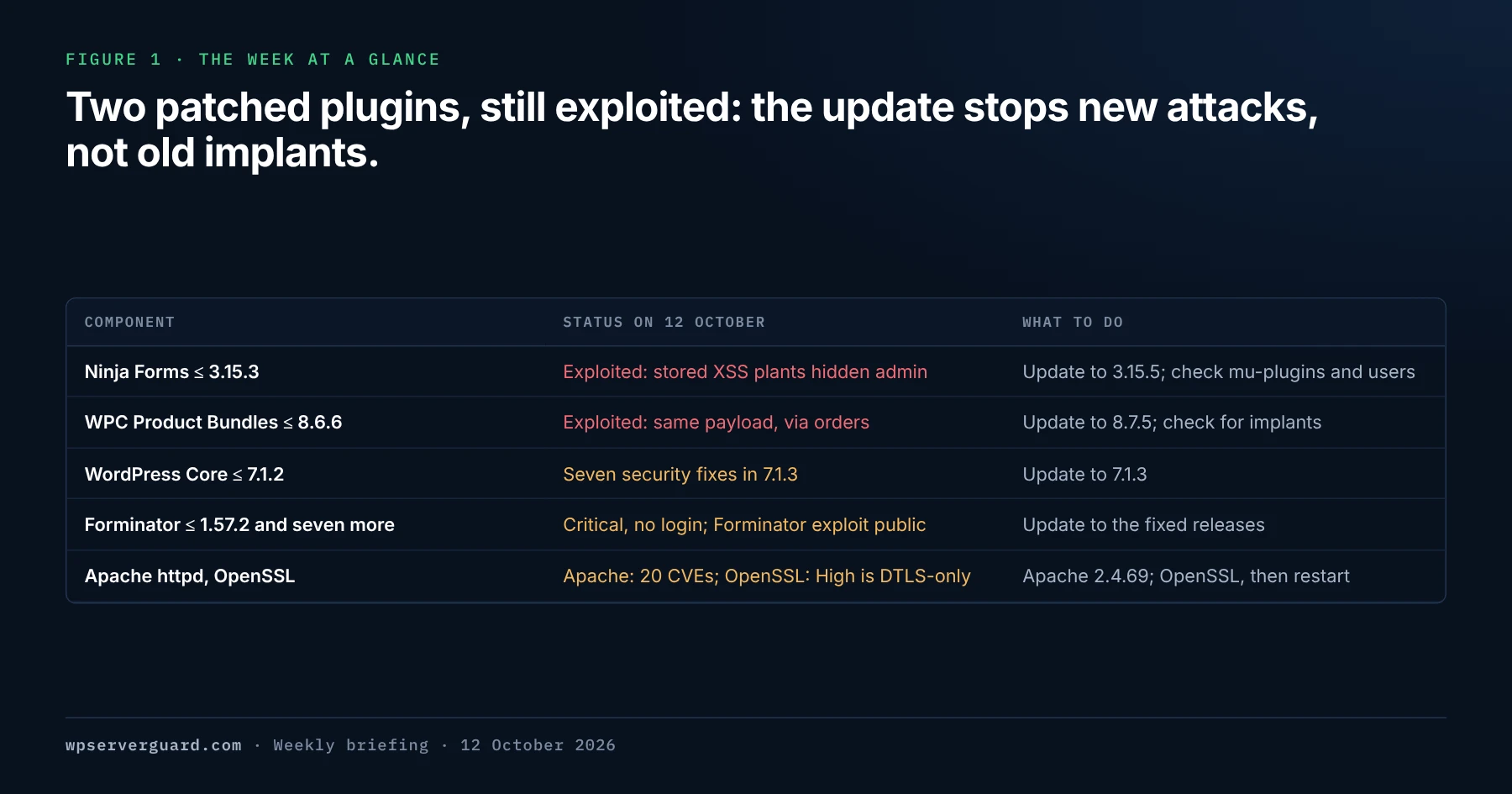
Figure 1 · The week at a glance
The five items that need action in the week to 12 October 2026: two plugin flaws exploited to plant hidden administrators, a Core security release, eight critical plugin fixes, and the server stack.
Ninja Forms and WPC Product Bundles · exploited
An attacker leaves a script in a form submission or an order without logging in. When an administrator opens it, the script installs a fake plugin and plants four separate ways back into the site. Fixed in Ninja Forms 3.15.4 and WPC Product Bundles 8.6.7.
WordPress Core · 7.1.3
A maintenance and security release from 6 October with seven security fixes, among them a stored XSS on the Comments screen and a second-order SQL injection in the export tool. Fixes for older branches are being backported to every branch back to 4.7.
Plugins · eight critical
Seven plugins disclosed on 9 October, all exploitable without a login. Four are rated 9.8 and three 9.1, not all 9.8 as some reports say. Forminator’s shortcode-execution flaw, fixed on 17 September, has had a public exploit since 19 September.
Server stack · patch and restart
Apache httpd 2.4.69 fixes twenty CVEs, none rated above moderate. OpenSSL’s 29 September release has one high-severity flaw, which affects DTLS only. The PHP and nginx fixes are from September and are listed here because they are easy to apply only partly.
Exploited · CVE-2026-94504 and CVE-2026-93836
Ninja Forms and WPC Product Bundles: one XSS, four ways back in
Patchstack published details on 6 October of a campaign that uses two unauthenticated stored cross-site scripting flaws. CVE-2026-94504 is in Ninja Forms 3.15.3 and earlier, which has more than 500,000 active installs: a value submitted anonymously through a paragraph text field is shown without proper escaping in the legacy submission editor. CVE-2026-93836 is in WPC Product Bundles for WooCommerce 8.6.6 and earlier, which has more than 30,000 installs: a bundle quantity such as 1 followed by HTML is stored as-is in the order item metadata. In both cases the attacker needs no account. The script runs when an administrator opens the submission or the order.
Both flaws were disclosed on 22 September, and both were already fixed: WPC Product Bundles in 8.6.7 on 19 September, and Ninja Forms in 3.15.4 on 21 September. The attacker’s domain, imgcdn1.com, was registered on 1 October. Patchstack saw the first exploitation request against WPC Product Bundles at 10:39 UTC on 4 October, and the same payload arriving through Ninja Forms on 5 October. It describes the volume as limited so far and expects the number of vulnerabilities used to deliver the payload to grow: “Two is what we have confirmed, not what we expect the final count to be.” Patchstack scores both flaws 7.1; the CVE records, scored by Wordfence, give 7.2. Neither is on CISA’s Known Exploited Vulnerabilities catalog.
The injected tag loads https://imgcdn1.com/fz/x.js into the administrator’s browser. The script does not steal the login cookie. It uses the administrator’s open session to install a plugin called “WP Smart Thumbnails” 1.2.4, by a made-up author named MediaPress Labs, through WordPress’s own installer. It then creates an administrator with credentials supplied by the attacker’s server, and runs a second-stage file, emer-run.php, which sets up the persistence. The files it drops take the timestamp of the oldest file in the WordPress root, so sorting by modification date will not bring them to the top.
A visible administrator, created through the normal Add User screen. The only one of the four that a site owner sees in the dashboard.
A hidden administrator, kept out of the Users screen by a must-use plugin. Its username is picked from about fifty operational-sounding words such as support, updater, maintenance, or backup; its email address is at wordpress.org; its password is 16 random characters.
A magic login link, /wp-login.php?_wplogin= followed by a token, that logs in as the site’s oldest existing administrator, not as the hidden one.
A file manager inside the fake plugin, with no authentication of any kind, reachable by a direct request.
How to tell whether the campaign reached your site, and how to clean it
Run these checks on every site that was still on a vulnerable version on or after 1 October, when the attacker’s domain was registered, including sites that are already updated. If you do not know when a site was updated, check it anyway. The indicators below come from Patchstack’s analysis.
Indicator
Where to look
What it means
imgcdn1.com, /fz/x.js, or /fz/c.php
Ninja Forms submissions, WooCommerce order item meta (_woosb_ids), access and proxy logs
The injected script is stored on the site, or a browser fetched it
wp-content/plugins/wp-smart-thumbnails/, with wp-smart-thumbnails.php and emer-run.php
File system and the Plugins screen
The fake plugin: a packed dropper with a built-in file manager, and the persistence installer
class-wp-query-xxxxxxxx.php (eight hex characters) and class-wp-token-validate.php
wp-content/mu-plugins
The must-use plugins that hide the extra administrator and issue login tokens. They are obfuscated with a per-site key, so there is no fixed hash to match
Options fz_emer_done_v1 and fz_emer_login_tokens
The wp_options table
The persistence stage ran on this site
Requests to wp-login.php with a _wplogin parameter
Access logs
Someone used the magic login link
An administrator in wp_users that the Users screen does not list, often with an @wordpress.org email
Cleaning up after the campaign: every layer in one pass
Patchstack’s recommended order, condensed. The point of doing it in one pass is that each layer the attacker left can rebuild the others.
01
Update both plugins to the current release
Ninja Forms 3.15.5, which also fixes a related stored XSS in rich-text paragraph fields (CVE-2026-90438), and WPC Product Bundles 8.7.5, which includes the further bundle-data hardening added in 8.7.3. If a site cannot be updated today, deactivate the plugin until it can.
02
Look for the implants before removing anything
Search for the indicators above and preserve copies of anything you find. Compare the administrators in the database with those the dashboard shows. Check the files in mu-plugins by content, not by date: their timestamps were forged.
03
Remove every layer in one pass
Delete the unauthorised accounts, the fake plugin, the must-use plugins, and both options. If you remove them one at a time, whatever is left can recreate the rest.
04
Rotate credentials and salts
Change every administrator password, starting with the oldest administrator account, which the magic link logs in as. Then replace the authentication keys and salts in wp-config.php so that existing sessions end.
05
Review what happened in between
Look for other changes to files and the database around the time an administrator opened form submissions or WooCommerce orders. Blocking the source IPs Patchstack lists is not a lasting fix: four of the five were Tor exit nodes.
WordPress 7.1.3 was released on 6 October as a maintenance and security release, with seven security fixes and four bug fixes. The security fixes are a stored cross-site scripting flaw on the Comments administration screen that can be triggered through pending comments; a denial-of-service issue in WP_Http::make_absolute_url(); a second-order SQL injection in the WXR export; a weakness that let users with the Author role make posts sticky; unauthenticated disclosure of comments on private and unpublished posts; cross-site scripting in Imgur embeds; and forgeable parameters that can cause action name collisions in the {status}_{type} hook.
The release announcement does not say any of them is being exploited, and none has been added to CISA’s KEV catalog. Sites with automatic background updates will update themselves. The fixes are being backported to every branch eligible for security fixes, currently back to 4.7, and those releases ship as they are ready. As with 7.1.2, WordPress actively supports only the latest version.
The Comments flaw is worth reading alongside this week’s campaign. Pending comments are text an anonymous visitor can submit and an administrator then opens: the same pattern as a form submission or an order, and the same reason not to postpone this update.
Eight critical plugin flaws, all exploitable without a login
The first seven were disclosed by Wordfence on 9 October and published as CVEs on 10 October. All eight scores are Wordfence’s, shown on NVD as the CNA score; NVD has not done its own analysis. None is on CISA’s KEV list and none has been reported exploited. Every one has a fixed release.
Severity
Plugin and CVE
Vulnerable
Fix
Critical, 9.8
Advanced IP Blocker — CVE-2026-104732, authentication bypass in its 2FA login
≤ 8.13.13
Update to 8.13.16, which also closes a second 2FA bypass through XML-RPC
Critical, 9.8
Extensions For CF7 (HT Plugins) — CVE-2026-94589, file upload through the signature field
≤ 3.4.5
Update to 3.4.6
Critical, 9.8
3D Product Configurator for WooCommerce (Expivi) — CVE-2026-103889, code execution through Dompdf
≤ 2.16.2
Update to 2.16.3
Critical, 9.8
WPCOM Member — CVE-2026-104803, social-login authentication bypass
≤ 1.7.27
Update to 1.8.0 or later
Critical, 9.1
Blocksy Companion — CVE-2026-107645, registration as a Dokan vendor
≤ 2.1.58
Update to 2.1.59
Critical, 9.1
PPOM for WooCommerce (Themeisle) — CVE-2026-104801, file deletion outside the uploads folder
≤ 34.0.10
Update to 34.0.11
Critical, 9.1
Avada Builder (ThemeFusion) — CVE-2026-97670, action hooks run from form fields
What each plugin flaw means, and which ones to deal with first
Forminator comes first, because it is the only one of the eight with working exploit code in public. Versions up to 1.57.2 pass a current_url value from an anonymous request into WordPress’s shortcode parser, so anyone can make the site run any shortcode it has registered. The CVE record describes this as arbitrary shortcode execution, not code execution. What an attacker can do with it depends on the shortcodes that other installed plugins and the theme provide, which is why some reports describe it as a route to remote code execution when combined with other plugins. WPMU DEV removed the vulnerable call in 1.57.2.1 and 1.57.3, both released on 17 September; a proof of concept and mass scanner appeared on GitHub on 19 September. Forminator has more than 600,000 installs. Wordfence lists three more flaws in the same versions — two unauthenticated stored XSS rated 7.2 and a missing authorization check rated 5.3 — which the current release also closes.
Blocksy Companion has the largest install base of the October seven, more than 300,000 sites, but the narrowest exposure. Its account modal accepted a role parameter at registration without respecting Dokan’s vendor-registration setting. The flaw is therefore relevant on sites that run WooCommerce with the Dokan marketplace plugin, where it gives an attacker a vendor account, not an administrator one.
Advanced IP Blocker is a reminder that a security plugin is still code on the attack surface. Its 2FA login flow could be bypassed: an attacker who knows the user ID of an account with the plugin’s 2FA enabled could try 6-digit codes with no rate limit. The fix in 8.13.14 adds a first-step token and a lockout after five failures, and 8.13.16, released on 10 October, closes a second bypass through XML-RPC. The other October flaws reach code execution or account takeover more directly. In Extensions For CF7 and the Expivi 3D Product Configurator, an anonymous visitor could upload or run PHP. WPCOM Member did not validate the state parameter of its social-login callback. PPOM let visitors delete files outside the uploads folder, including wp-config.php, and deleting that file is a known route to taking over an installation by re-running the setup.
Avada is a premium theme, so its fix arrives through the theme’s own updater, not through WordPress.org. The flaw lets an anonymous visitor trigger arbitrary WordPress action hooks through a field placeholder in an Avada form notification, which is how the default setup works, and can be used to delete trashed content permanently or take the site down. The CVE record numbers the vulnerable Builder versions in the 7.x series used by the theme, so update Avada to 7.16.2, released on 30 September, and let it update its bundled plugins.
Apache httpd 2.4.69 was released on 1 October as “a security, feature and bug fix release”, recommended over all previous versions. It fixes twenty vulnerabilities: five rated moderate and fifteen low, none important or critical. Most affect modules a typical WordPress server does not load, such as mod_dav, mod_vhost_alias, mod_auth_digest, and mod_proxy_uwsgi. The one that matters on many WordPress hosts is in mod_http2, because HTTP/2 is widely enabled.
Among the fifteen low-severity fixes are a limited code-execution issue when internal redirects reach non-CGI files in a CGI directory (CVE-2026-42356, 2.4.60 to 2.4.68), a use-after-free in mod_rewrite through %{LA-U:HTTP:...} (CVE-2026-56154), and response smuggling through mod_proxy_uwsgi (CVE-2026-63718).
Moderate CVE
Module
What it is
CVE-2026-57941
mod_http2
Use-after-free and wild write through re-entrancy in a shared session buffer
CVE-2026-42528
mod_dav
Shared-lock overflow; a client that can take locks can crash child processes
CVE-2026-93546
mod_dav_fs
Integer overflow from a PROPPATCH with many XML namespaces; crashes workers and corrupts the property database
CVE-2026-63292
mod_vhost_alias
Stack overflow from an oversized Host header, with VirtualDocumentRoot and a raised LimitRequestFieldSize
CVE-2026-59685
core (Windows only)
Out-of-bounds write when rewriting canonical names on case-insensitive file systems
OpenSSL, nginx, and PHP: fixes from the last two weeks that are easy to apply halfway
OpenSSL released 4.0.3, 3.6.5, 3.5.9, and 3.4.8 on 29 September, fixing fourteen CVEs across the four branches: 4.0.3 carries all fourteen, 3.6.5 and 3.5.9 thirteen, and 3.4.8 twelve. The only high-severity one is CVE-2026-84782: DTLS retransmits handshake messages from a stale buffer offset, which can send heap memory to the peer or crash the process. It matters to DTLS users such as VPN, WebRTC, and VoIP services, not to an ordinary HTTPS web server. A moderate use-after-free in the X.509 extension cache, CVE-2026-84783, affects 4.0 only, and several of the low-severity fixes are in QUIC. OpenSSL 3.1, 3.2, and 3.3 are out of support and were not analysed. The public fix for 3.0, which many server distributions still ship, is available only to premium-support customers as 3.0.23, so on those systems the fix comes from your distribution’s own backport.
nginx 1.31.6 and 1.30.5, released on 15 September, fix CVE-2026-90439, a heap buffer overflow in a worker process when HTTP/3 is used with OpenSSL 3.5.0 or earlier. nginx rates it medium. Only builds that include ngx_http_v3_module are affected, and the module is not built by default; nginx -V shows whether --with-http_v3_module is present. HTTP/3 is served only on listen sockets marked quic. If you cannot upgrade yet, removing quic from the listen directives, together with the Alt-Svc header that advertises it, or setting http3 off, turns it off. The July releases 1.31.3 and 1.30.4 fixed CVE-2026-42533, a major-severity buffer overflow when map is used with regular expressions, which affected every version from 0.9.6.
PHP’s 24 September security releases, 8.2.34, 8.3.35, 8.4.26, and 8.5.11, were covered here last week through cPanel’s EasyApache 4 update. One of their fixes deserves a second look on servers that do not use cPanel. CVE-2026-91767 is a heap over-read in PHP’s OpenSSL wildcard name matching: a malicious TLS server can present a certificate with a crafted wildcard common name and make the PHP client read past a buffer, which can crash it or disclose memory. The PHP advisory rates it moderate, CVSS 6.5. Because verify_peer_name is on by default, ordinary outbound HTTPS calls are exposed: update checks, API requests, webhooks. Debian shipped a fixed php8.4 for trixie on 25 September. Ubuntu’s tracker, last updated 7 October, still listed every supported PHP package as vulnerable, with no update notice.
CloudLinux kernels, cPanel builds, OpenLiteSpeed, and 501 plugin flaws in one week
CloudLinux · bridge-stp-uaf update
The fixed kernel for CVE-2026-72389, 4.18.0-553.157.1.lve.2, finished rolling out to stable on CloudLinux 7h and 8 on 6 October. CloudLinux 8 LTS and 9 LTS kernels were still in beta at CloudLinux’s 7 October update, and KernelCare does not cover 8 LTS. CloudLinux 9 and 10 have livepatches only. CloudLinux for Ubuntu 22.04 follows Canonical’s fix from 6 October.
cPanel and WHM · builds 138.0.13 and 138.0.15
Released on 5 and 8 October, both list “Security hardening” with no CVEs named. The last targeted security release, with its three critical fixes, was 138.0.11 on 29 September.
OpenLiteSpeed · 1.9.3
Released on 29 September with “security hardening for update script”. That hardening is CVE-2026-104474, a local privilege escalation through admin/misc/lsup.sh, rated 6.7 and published on 2 October.
Wordfence · plugin flaws, 28 September to 4 October
501 vulnerabilities in 367 plugins and 9 themes, 20 of them critical and 52 unpatched when the report went out on 9 October. Two critical file-upload flaws had no fix: Kognetiks Chatbot up to 2.4.9 (CVE-2026-32579) and Zombify up to 1.7.7 (CVE-2026-94503). Kirki up to 6.3.1 and AcyMailing up to 11.0.5 are among the 9.8-rated code-execution fixes.
What this week means: the admin screen is part of the attack surface
The campaign this week, and the Comments flaw fixed in 7.1.3, share one pattern: an anonymous visitor submits something, and the attack happens later, when an administrator opens it. Form entries, WooCommerce orders, and pending comments are all text from strangers that WordPress shows inside a logged-in session. The attacker does not need the administrator’s password. The administrator’s browser does the work. That is why the update gap matters: the attack can wait in a submission until someone opens it.
It also changes what a clean result means. A security plugin that scans files will not see an administrator that exists only in the database, a login token stored in wp_options, or a must-use plugin with a forged timestamp and a hash unique to each site. A cleanup that stops at “plugin updated, scan clean” leaves the hidden administrator and the magic login in place. The check has to cover the database and mu-plugins directly.
On the server side, the pattern this month is updates that look applied but are not fully in effect: a library that is updated on disk while services keep running the old copy, a PHP package still waiting for its distribution’s fix, an HTTP/3 listener nobody remembers enabling. Checking the running state, not the package list, is what closes those gaps.
The second action is a read-only check. Run it from a trusted device, and if anything produces a result you cannot explain, preserve it before changing anything.
01
Update Ninja Forms and WPC Product Bundles
Ninja Forms to 3.15.5, WPC Product Bundles for WooCommerce to 8.7.5. If a site cannot be updated today, deactivate the plugin until it can.
02
Check for the campaign’s implants
On every site that ran a vulnerable version on or after 1 October, or where you are not sure: wp-content/plugins/wp-smart-thumbnails, files in wp-content/mu-plugins, the options fz_emer_done_v1 and fz_emer_login_tokens, administrators in the database that the dashboard does not list, imgcdn1.com in submissions and order meta, and _wplogin requests in the logs.
03
Update every site to WordPress 7.1.3
Or to the security release for its branch as backports ship. Confirm the version on every site rather than assuming automatic updates ran.
04
Update Forminator and the other seven plugins
Forminator first, because its exploit is public. Then the versions in the table above, followed by a look at accounts, uploads, and wp-config.php on sites that ran a vulnerable version.
05
Patch OpenSSL and restart what uses it
Install your distribution’s fixed package, then restart the web server, PHP-FPM, and other services that link OpenSSL, or reboot. Use needrestart or needs-restarting to confirm nothing still runs the old library.
06
Upgrade Apache or confirm the backport
Move to 2.4.69 if you build from source; otherwise check that your vendor’s package includes the fixes, mod_http2 first.
07
Check nginx for HTTP/3
Run nginx -V. If the build includes --with-http_v3_module and the version is older than 1.31.6 or 1.30.5, upgrade, or remove quic from the listen directives until you can.
08
Check PHP packages on Ubuntu and other distributions
Confirm the PHP builds the sites actually use include the 24 September fixes. Where a distribution has not shipped them yet, as Ubuntu had not by 7 October, watch for its update notice.
09
Finish the CloudLinux kernel work
On CloudLinux 7h and 8, install the stable kernel and reboot, or confirm the livepatch. On 8 LTS, keep the module mitigation in place until the fixed kernel leaves beta.
This briefing was compiled on 12 October 2026 from the published sources below. Versions, dates, and figures are quoted as the source reported them and were not independently re-measured. Plugin fix versions were checked against the plugins’ WordPress.org changelogs where the vulnerability databases did not list them. Where a claim rests on a single source, the source is named next to it in the text.
Common questions about this week’s WordPress security news
I updated Ninja Forms and WPC Product Bundles. Am I safe?
Safe from new injections, yes. Not necessarily clean. If either plugin was installed and out of date when the attacks began on 4 October, check for the wp-smart-thumbnails plugin, files in wp-content/mu-plugins, the options fz_emer_done_v1 and fz_emer_login_tokens, and administrators in the database that the Users screen does not list. The update removes none of them.
Why can’t I see the extra administrator in the dashboard?
Because one of the must-use plugins the attacker installs filters it out of the Users screen, and the same filter can hide it from other tools that run through WordPress. Query the database directly — the wp_users table, joined to the wp_capabilities rows in wp_usermeta — and compare the administrators it lists with the ones the dashboard shows. An administrator with an @wordpress.org email address and a generic name such as support or updater is a strong sign.
Does the attacker need an account on my site?
No. Both flaws accept the malicious input from anyone: a Ninja Forms submission or a WooCommerce order. The attack runs when an administrator later opens that submission or order in the dashboard, using the administrator’s own session.
Is the Forminator flaw a remote code execution?
Not on its own. It lets anyone make the site run any shortcode that is registered on it. Whether that leads further depends on which shortcodes other plugins and the theme provide. A public exploit has existed since 19 September, so update to the current release regardless.
Do I need to restart anything after updating OpenSSL?
Yes. Running services keep the old library in memory until they restart. Restart the web server, PHP-FPM, mail and anything else that uses TLS, or reboot, and check with needrestart or needs-restarting that nothing still uses the old version.
Choose the response path
The containment plan should match the size of the incident.
One site, one worrying result
Get the finding classified and the site restored to a trusted state.
Best when the checks turned up a hidden administrator, the wp-smart-thumbnails plugin, unexplained mu-plugins, or a _wplogin request, and you want every layer removed in one pass rather than one at a time.
Best when you run your own Apache or nginx, OpenSSL and PHP updates need confirming across several servers, or CloudLinux kernels are still waiting for a reboot.